Showing posts with label netflow. Show all posts

Sunday, May 25, 2025

That Grumpy BSD Guy: A Short Reading List

© 2025 Peter N. M. Hansteen

A collection of pointers to things I have written and that I think may be of value to you too, my fellow geek friend

I was recently (late May of 2025) asked to provide a list of things I have written over the years that would be suited to offer useful insights to someone not familiar with my work or the field(s) I cover.

In addition to the book I wrote and have revised when the time seemed right, I have written the odd blog post over the years, and this is the list I came up with, in roughly reverse chronological order:


Note: This piece is also available without trackers but classic formatting only here.

EU CRA: It's Later Than You Think, Time to Engineer Up! (2025) -- A call for stepping up to real, good engineering practices in software development and maintenance, with a slight emphasis on the fact that by the end of 2027, there will be legislation in force that will in fact compel the industry to act. Expands on the earlier No Project Is an Island: Why You Need SBOMs and Dependency Management (2025) with a view to performing an introductory workshop for working or aspiring developers and devops/sysadmins. And perhaps even their suits-clad managers.

For Upcoming PF Tutorials, We Welcome Your Questions (2025) -- I have been giving PF tutorials for about 20 years, for the last few years in cooperations with Max Stucchi and Tom Smyth. This piece was written to encourage questions and other input while we are preparing for the BSDCan 2025 session, which we are still working on preparing as I write. However, we always welcome your input and we have provided contact information in the piece itself. Also available tracked, prettified.

Eighteen Years of Greytrapping - Is the Weirdness Finally Paying Off? (2025) -- A long-running experiment, started all the way back in 2007, with the intent to make undesired activity less desirable to engage in, reached a milestone of sorts. That event I considered significant enough that I finally wrote that retrospective some of my readers and correspondents had been asking me to do for some time. Also available tracked, prettified.

No Project Is an Island: Why You Need SBOMs and Dependency Management (2025) -- This piece is really about software engineering coming to grips with what real world engineering is all about. The world, or parts of it, finally decided that we could no longer consider software "just a bit of typing", and we are answering the challenge by leveraging lessons learned by working on free software. A further evolved version could turn up at future public events. Also available tracked, prettified.

A Suitably Bizarre Start of the Year 2025 (2025) -- Because, well, the time around the start of the year showed up a few truly bizarre things, a surge in truly nonsensical spamming activity being one item. The number of imaginary friends collected has kept up the pace, see links in the piece itself for up to date information. Also available tracked, prettified.

You Have Installed OpenBSD. Now For The Daily Tasks. (2024) -- I am much indebted to Solène Rapenne for pointing out to me that two earlier pieces I had written about life with OpenBSD were, while not actually wrong, just quite a bit out of date. This piece recitifies that situation, and provides some basic advice for day to day life with our favorite operating system. Also available tracked, prettified.

Three Minimalist spamd Configurations for Your Spam Fighting Needs (With Bonus Points at the End) (2024) -- Fresh off writing his excellent mail server book, Michael W. Lucas posted a thing on the Mailop list that had me write a short piece on domain-only trapping (linked in this one), and after a quick think, also this piece that offers other minimalist but actually usual configurations. Also available tracked, prettified.

The Despicable, No Good, Blackmail Campaign Targeting ... Imaginary Friends? (2022) -- A follow-up to an earlier piece on the embarrasment-based extortion spamming campaigns we had been seeing for some years. This piece makes a hopefully clearer case than the previous one that the potentially embarrasing video material the messages claim exist most likely does not. After all, multiple thousands of addresses that have been known to never have existed are targets of these campaigns, swelling temporarily the list of greytrapped hosts. Also available tracked, prettified.

A Few of My Favorite Things About The OpenBSD Packet Filter Tools (2022) -- The good people at SEMIBUG asked me to give a PF talk for one of their user group meetings. This is the writeup for that talk, with links to slides and other material. Very much colored by my tastes, but hopefully useful. Also available tracked, prettified.

Badness, Enumerated by Robots (2018) -- Way back when, I started setting my systems to collecting IP addresses that were the source of undesirable activity and publishing updated lists at intervals. That activity stayed useful for longer than I had anticipated, and at some point I wrote this summary of what those systems do, with references to other resources, of course. Also available tracked, prettified.

Maintaining A Publicly Available Blacklist - Mechanisms And Principles (2013) After running the greytrap-based blocklist for some years, I felt the need to explain my thinking about the hows and whys. The first paragraph sums it up,

When you publicly assert that somebody sent spam, you need to ensure that your data is accurate. Your process needs to be simple and verifiable, and to compensate for any errors, you want your process to be transparent to the public with clear points of contact and line of responsibility.

-- Also available tracked, prettified.

Yes, You Too Can Be An Evil Network Overlord - On The Cheap With OpenBSD, pflow And nfsen (2014) -- "Have you ever wanted to know what's really going on in your network? Some free tools with surprising origins can help you to an almost frightening degree.". Yes, with tools that are either part of OpenBSD or within easy reach via the package system, you only need to put in rather modest efforts to reveal deep truths about the life on your network. Also available tracked, prettified.

Effective Spam and Malware Countermeasures - Network Noise Reduction Using Free Tools (2014) -- Originally a BSDCan paper from the late noughties, with emphasis on the exploit mitigation techniques in OpenBSD and how to leverage them in the effort to limit or even get rid of spam and malware. Even after all those years, some aspects of this text are still quite relevant. This piece has seen occasional updates as indicated by the copyright line. Also available tracked, prettified.

The Hail Mary Cloud And The Lessons Learned (2013) -- The Hail Mary Cloud was a widely distributed, low intensity password guessing botnet that targeted Secure Shell (ssh) servers on the public Internet. The first activity may have been as early as 2007, but our first recorded data start in late 2008. This summary article describes the botnet activities and countermeasures as well as offering some more forward-looking statements about Internet security. Also available tracked, prettified.

Those, I said to my correspondent, are likely the more interesting entries.

If you have read this far and found something useful or enlightening by visiting the linked items, that will make me happy to have turned some Sunday afternoon procrastination into something useful to others. And I have this to offer as a bonus for your perseverance:

I have also been a guest blogger at blog.apnic.net:

What every IT person needs to know about OpenBSD (2021) in three parts, starting with What every IT person needs to know about OpenBSD Part 1: How it all started (also the original in one piece, What every IT person needs to know about OpenBSD (tracked, prettified), and

A few of my favourite things about the OpenBSD Packet Filter tools (2022) also ran as a two part series at APNIC, starting with A few of my favourite things about the OpenBSD Packet Filter tools (part 1) and A few more of my favourite things about the OpenBSD Packet Filter tools (part 2)


Upcoming events:

Ottawa, Canada: BSDCan 2025 has tutorials June 11-12, 2025 and talks June 13-14. A new version of Network Management with the OpenBSD Packet Filter Toolset will go ahead there.

A little later on in 2025, the EuroBSDcon 2025 conference is still accepting submissions for papers and tutorials, so if you have an interesting BSD-related topic you want the world to know about, your submissions will be welcome at the EuroBSDcon submissions system, where the deadline is 2025-06-21, or June 21st, 2025 (full disclosure: I'm on the program committee). This year's conference is set in beautiful Zagreb, Croatia in late September.

At EuroBSDcon 2025, there will be a Network Management with the OpenBSD Packet Filter Toolset session, a full day tutorial starting at 2025-09-25 10:30 CET. You can register for the conference and tutorial by following the links from the conference Registration and Prices page.

Separately, pre-orders of The Book of PF, 4th edition are now open. For a little background, see the blog post Yes, The Book of PF, 4th Edition Is Coming Soon. We are hoping to have physical copies of the book available in time for the conference, and hopefully you will be able to find it in good book stores by then.


Thursday, February 27, 2014

Yes, You Too Can Be An Evil Network Overlord - On The Cheap With OpenBSD, pflow And nfsen

Have you ever wanted to know what's really going on in your network? Some free tools with surprising origins can help you to an almost frightening degree.

One question I get a lot (or variants that end up being very close) is, "How do you keep up with what's happening in your network?". A close cousin is "how much do you actually know about your users?".

The exact answer to both can have legal implications, so before I proceed to the tech content, I'll ask you to make sure you understand the legal framework you will be working under with respect to any regulatory requirements or other legal limits as they apply to monitoring in general and your users' privacy in particular before you proceed to setting up a monitoring infrastructure. Legalisms can be tiring to a techie, but illegality can bite you really really hard.

Now for the tech side of things, of course I have network monitoring and a few favorite tools. This article has been brewing, for some values of, for quite a while. While I was collecting notes and anecdotes, last (Northern hemisphere, 2013) summer yielded news stories that showed more pervasive surveillance than most had even imagined, operated by a three letter US government agency, and writing about the relatively benign techniques in my favorite toolbox became less appealing for a while.

But the questions about how to really get to know your network are still relevant to networking practitioners, so I'll let you in on a few not really secret facts about how it's done. Of course all of the things I describe here are easier if you're using OpenBSD, but then you probably knew that fact about our favorite operating system already.

OpenBSD has traditionally had an impressive suite of networking tools, and as we know every release brings new enhancements and sometimes brand new tools for us to make use of.


Enter pflow(4), Yet Another Network Pseudo Device

The NetFlow protocol was invented at Cisco in the early 1990s. It's designed to collect traffic metadata, where the basic unit of reference is the flow, defined as the source and destination IP address pair, the matching source and destination port for protocols that use them, the protocol identifier, time started and ended, number of packets sent, number of bytes sent, and a few other fields that have varied somewhat over the NetFlow versions.

Flows are unidirectional, and a TCP connection will typically consist of a pair of flows, one in each direction. For contexts where you do not need to store the content of the traffic, this is the data you want. A multi-gigabyte file transfer, once it concludes, will produce a netflow record that takes up only on the order of a few hundred bytes, much the same as the almost dataless name service request that probably preceded it.

On OpenBSD, various netflow sensors and collectors had been available for a while when the new network pseudo device pflow(4) debuted in OpenBSD 4.5. As you would expect on OpenBSD, pflow is tightly assosciated with PF, and collecting data from an OpenBSD machine (typically a gateway) involves adding the state option pflow to PF rules that you want to collect Netflow data for, much like you would pick rules for logging with log or log (all) options. To wit, a rule for collecting pflow data would look something like this:

pass out log inet proto tcp from <clients> to port $email keep state (pflow)

But then generating pflow data proved so enormously useful in a lot of contexts that the OpenBSD 4.5 release also included an option to set state-defaults that would apply to all rules in the rule set unless specifically excempted. You guessed it, the most popular set in a number of PF shops became

set state-defaults pflow

more or less overnight after the OpenBSD 4.5 release.

Once you have reloaded your rule set with the pflow option in place, you are generating pflow data (in this case, for any traffic that matches a pass rule in the rule set). But to actually get the data to somewhere you can study them, you need to set up both a sensor and collector. The sensor is the pflow interface, which you configure via ifconfig commands, or for a permanent configuration, in the /etc/hostname.pflow0 interface configuration file. The /etc/hostname.pflow0 on the gateway closest to me right now looks like this:

flowsrc 213.187.179.198 flowdst 192.168.103.252:9995
pflowproto 10

which means, essentially, that any pflow data generated will be sent with a source address of 213.187.179.198 to the collector we hope is listening at 192.168.103.252, UDP port 9995. Every flow is recorded, and sent to the collector. The flowproto 10 part means we use flow protocol version 10, the latest one with all the newest bells and whistles (which is recommended on OpenBSD only on version 5.5 or newer).


The Collector

Up to this point, you are free to choose any collector at all, or for that matter, let your pflow sensor send data endlessly into the void. In The Book of PF I spend quite a bit of time explaining netflow via Damien Miller's excellent flowd, mainly because it's damned fine software and very well suited for the purpose, but here I'll go the lazy route and show you the tool I actually use, which is nfsen, which comes out of the OpenBSD package system with a usable web interface as a front end to nfcapd and a host of related tools.

Do take some time to click that nfsen reference, the documentation there is quite usable and provides better illustrations than what I can offer at the moment.

Installing nfsen on OpenBSD is, as expected, as simple as can be. On an otherwise normally configured OpenBSD system, the single command

$ doas pkg_add nfsen

will get you most of the way there. Do read the package readme as the messages instruct you to. Basically, you will need edit the configuration file /etc/nfsen.conf. Adding data sources is likely the only thing you will need to do at first, look for the stanza that looks like this:

%sources = (
    'upstream1'    => { 'port' => '9995', 'col' => '#0000ff', 'type' => 'netflow' },
    'peer1'        => { 'port' => '9996', 'IP' => '172.16.17.18' },
    'peer2'        => { 'port' => '9996', 'IP' => '172.16.17.19' },
);

Here you add the sources you have configured earlier. I give all my sources a distinct color (picking among the CSS-style RGB values you youngsters probably know by heart but old farts like me always have to look up), IP address, type and port, so it's easier to tell them apart.

Then you run a perl script to configure the package, start httpd, start the nfsen package (and add it to the pkg_scripts= line in your /etc/rc.conf.local so it will start at next reboot too).

That's all there is to it. Soon the web interface will start filling in the graphs, and you can point and click your way around address ranges, time ranges and a host of other parameters. You will find that every connection you specified in your configuration is indeed logged, and you have all the metadata you asked for.

After a while you will start appreciating that nfsen displays the command line version of your point and click choices, so you have a better starting point for those wrinkles in the data that are not easily or at all accessible via the web interface.


The All-Seeing Eye Of The Evil Network Overlord

You can tell just who, or at least what IP addresses interacted with each other when, how much data was transferred and to of from what services or ports. It stands to reason that in most jurisdictions there are rules about how data of this kind is to be handled and secured. Make sure you deal properly with the data you collect, staying within whatever limits apply to you. But within those limits, here's your chance to be an evil network overlord. Use it wisely.

Netflow data has been used for a number of things. In his very readable book Network Flow Analysis, Michael W. Lucas relates a story about how they pinpointed the source of entry for a Windows worm into a corporate network using netflow data. I've found netflow to be very useful in a number of contexts myself (as briefly mentioned in the earlier DDOS article, and using netflow data to charge for metered access is not unheard of either), but the most striking example I've seen did not involve an attack, merely an intermittent network nuisance that occasionally cost insane amounts of money.

The setting was this: A couple of years ago, I was a relatively new hire in a large corporation that serves IT services of various kinds among others to an almost equally-sized financial firm. In one part of the financial firm there was a place where trades involving dollar values larger than most of us can imagine were made using a telnet interface to something else, and the 80 by 25 character displays were at times not moving at all. Trades were lost because the tiny packets did not arrive on time.

By the time I joined the company, the regular network crew that took care of that particular arm of the financial firm had been unsuccessfully trying to debug and fix the disruptions for quite a while. A call went out for help, and I proposed setting up a Netflow collector much like what I described earlier in the article.

The proposed budget was pretty close to nothing at all besides my time, so I got the go-ahead. The OpenBSD part of the configuration was done inside half an hour, and after peeking at Michael's book I even fished out the right sequence for the Cisco wranglers to input in their gear so useful data started arriving.

Then came the long wait. Graphs were accumulating, and after a while I would put several weeks' graphs on top of each other and hold them up to a light source. They matched perfectly. I could tell when people started arriving at work, I could tell when trading started in various cities, I could see the dip for lunch breaks, and the traffic peak for the nightly backups was easy to identfy.

But the source of the random network disruption did not turn up in the overall data volumes.

After a few weeks, I asked the local IT support to send me an email as soon as possible when disruptions occurred, with the name and/or IP address of the computers seeing disruption. Soon after, the first messages started arriving. I used the nfsen web interface to search the data around the reported times and looking at the IP ranges. At first, nothing really stood out. There was no sudden increase in data transferred at my sensors.

But then it occurred to me that the overall data volume was not necessarily the problem, so I started looking at hosts in the likely address range by number of flows (as in, number of open connections). That was all it took. Going back over a handful of reports, I noticed that on every occasion, for a few minutes one particular IP address stood out. For a very short time, a few days every week, one host on the network owned essentially all flows that passed by my sensors. No other host came even close.

It turned out that the machine was used to generate some rather heavy duty reports, collecting data from a large number of data sources. My guess is that the reporting software was one of those things that started small and grew over time, and after a few years it became a marked liability, simply because it was connected to the same switch that the traders were using, and reports were generated during trading hours.

I wrote up my report with graphs taken from nfsen (since destroyed and anyway not for public consumption, ever), and recommended that they find a way to move the report generator off to a separate location, perhaps even one with better connectivity to important data sources. I think they took that advice and acted upon it, but I suppose I'll never know for sure.

If you're interested in network traffic monitoring in general and NetFlow tools in particular, you could do worse than pick up a copy of Michael W. Lucas' recent book Network Flow Analysis. Michael chose to work with the flow-tools family of utilities for the book, but he does an outstanding job of explaining the subject in both theory and practical applications. What you read in Michael's book can easily be transferred to other toolsets once you get at grip on the matter.

I've focused mainly on OpenBSD here, but netflow sensors exist or should exist for essentially anything that has a TCP/IP stack. And nfsen works well on Linux and other Unix-like systems, too, I've heard tell.


As I write this I'm still working on the third edition of The Book of PF. The third edition came to be mainly because of changes introduced in OpenBSD 5.5, and the plan we're working towards is to have the book ready in time for the release. As you may have seen elsewhere, The Book of PF, 4th Edition is now available, with updates covering OpenBSD 7.8 and FreeBSD 14.n, with some forward looking material on OpenBSD 7.9 and FreeBSD 15 as well as previews of features that will be in FreeBSD 16 only.x

BSDCan: I will be at BSDCan again this year, offering two tutorials (see the Upcoming Talks panel at top right). More details will follow later, but these sessions will be designed mainly from input I receive from prospective attendees, and so will be critically dependent on your input, or even more so than earlier. See you there!


Update 2014-03-01: Thanks to Sebastian Benoit for pointing out that configuring pflow with flowproto 10 is really only well supported on OpenBSD 5.5 and newer.

Update 2014-04-27: PF tables vs html tags sometimes does not end well. Fortunately fixable.

Update 2015-10-25: For running nfsen with the OpenBSD httpd (and possibly others), you likely will be happier if you add php_fpm (which the nfsen package pulls in as a dependency) to the pkg_scripts variable in your /etc/rc.conf.local, much like this:

pkg_scripts="php_fpm nfsen" 

Discovered the hard way, one could say, only after a power outage broke the serenity of my lab's nfsen installation, the web server only spitting out 500 internal server error messages.

Update 2015-10-30: Several correspondents have asked whether NetFlow export is doable on various proprietary products. The answer is in most cases yes, but terminology may vary. On Cisco products you can be fairly sure to find terms NetFlow and IPFIX, while I discovered today that Citrix Netscaler for reasons of their own entirely mask the feature behind the term AppFlow. For other products, check the documentation for the obvious keywords.

Update 2026-02-24: Typokill and information about The Book of PF, 4th Edition.

Tuesday, December 25, 2012

DDOS Bots Are People! (Or Manned By Some, At Least)

Mitigating a DDOS attack against your infrastructure involves both people skills and tech skills. Whining won't cut it at all. The underlying problem remains the sad fact that the botnet herders are able to find fresh hosts for their malware. Should we start publishing more information about those pesky DDOS participants?

I have a confession to make. For a while and up until recently, one of my name servers was in fact an open resolver. The way I discovered and fixed the problem was by way of a rather crude DNS based DDOS.

Regular readers (Hi, Bert!) will be aware that I haven't actually published anything noteworthy for a while. So I was a bit surprised to find in early December 2012 that bsdly.net and associated domains was under a DNS based distributed denial of service (DDOS) attack. The attack itself appeared to be nothing special -- just a bunch of machines sending loads and loads of rubbish DNS requests directed at the IP addresses listed as authoritative masters for a few selected domains.

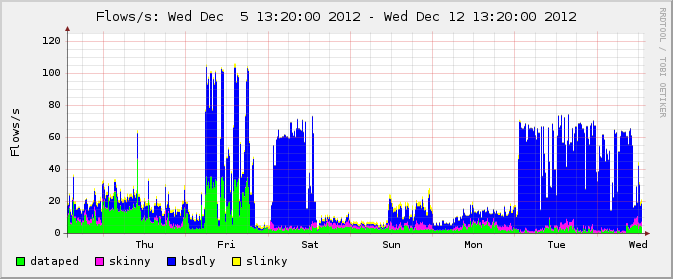
The targets were on relatively modest connections (think SOHO grade), so their pipes were flooded by the traffic and the people who were relying on that connectivity were not getting much network-related done. The sites weren't totally offline, but just about anything would time out without completing and life would be miserable. I've made a graph of the traffic available here, in a weekly view of that approximate period that nicely illustrates normal vs abnormal levels for those networks, generated by nfsen from pflow(4) data.

The networks under attack were in this instance either part of my personal lab or equipment used and relied upon by old friends, so I set out to make things liveable again as soon as I was able. Read on for field notes on practical incident response.

Under Attack? Just Block Them Then!
My early impulse was of course to adjust the PF rules that take care of rapid-fire brute force attacks (see eg the tutorial or the book for info) to swallow up the the rapid-fire DNS as well. That was unfortunately only partially successful. We only achieved small dips in the noise level.

Looking at the traffic via tcpdump(8) and OpenBSD's excellent systat states view revealed that the floods were incoming at a fairly quick pace and was consistently filling up the state table on each of the firewalls, so all timeouts were effectively zero for longish periods. A pfctl -k directed at known attackers would typically show a few thousand states killed, only to see the numbers rise quickly again to the max number of states limit. Even selectively blocking by hand or rate-limiting via pf tricks was only partially effective.

The traffic graphs showed some improvement, but the tcpdump output didn't slow at all. At this point it was getting fairly obvious that the requests were junk -- no sane application will request the same information several thousand times in the space of a few seconds.

It Takes People Skills. Plus whois. And A Back Channel.
So on to the boring part. In most cases what does help, eventually, is contacting the people responsible for the security of the networks where the noise traffic originates. On Unixish systems, you have at your fingertips the whois(1) command, which is designed for that specific purpose. Use it. Feeding a routeable IP adress to whois will in most circumstances turn up useful contact data. In most cases, the address you're looking for is abuse@ or the security officer role for the network or domain.

If you're doing this research while you're the target of a DDOS, you will be thanking yourself for installing a back channel to somewhere that will give you enough connectivity to run whois and send email to the abuse@ addresses. If your job description includes dealing with problems of this type and you don't have that in place already, drop what you're doing and start making arrangements to get a back channel, right now.

Next up, take some time to draft a readable message text you can reuse quickly to convey all relevant information to the persons handling abuse@ mail at the other end.

Be polite (I've found that starting with a "Dear Colleague" helps), to the point, offer relevant information up front and provide links to more (such as in my case tcpdump output) for followup. Stress the urgency of the matter, but do not make threats of any kind, and save the expletives for some other time.

The issue here is to provide enough information to make the other party start working on the problem at their end and preferably inspire them to make that task a high priority one. Do offer an easy point of contact, make sure you can actually read and respond to email at the address you're sending from, and if necessary include the phone number where you are most easily reachable.

When you have a useful template message, get ready to send however many carefully amended copies of that message to however many colleagues (aka abuse@) it takes. Take care to cut and paste correctly, if there's a mismatch between your subject and your message body on anything essential or inconsistencies within your message, more likely than not your message will be discarded as a probable prank. Put any address you think relevant in your Cc: field, but do not hold out any high hopes off useful response from law enforcement. Only directly affected parties will display any interest whatsoever.

Fill in any blanks or template fields with the output from your monitoring tools. But remember, your main assets at this point are your people skills. If the volume is too high or you find the people part difficult, now is the time to enlist somebody to handle communications while you deal with the technical and analysis parts.

You will of course find that there are abuse contact addresses that are in fact black holes (despite the RFC stating basic requirements), and unless you are a name they've heard about you should expect law enforcement to be totally useless. But some useful information may turn up.

Good Tools Help, Beware Of Snake Oil
I've already mentioned monitoring tools, for collecting and analyzing your traffic. There is no question you need to have useful tools in place. What I have ended up doing is to collect NetFlow traffic metadata via OpenBSD's pflow(4) and similar means and monitoring the via NFSen. Other tools exist, and if you're interested in network traffic monitoring in general and NetFlow tools in particular, you could do worse than pick up a copy of Michael W. Lucas' recent book Network Flow Analysis.

Michael chose to work with the flow-tools family of utilities, but he does an outstanding job of explaining the subject in both theory and in the context of practical applications. What you read in Michael's book can easily be transferred to other toolsets once you get at grip on the matter.

Unfortunately, (as you will see from the replies you get to your messages) if you do take an interest in your network traffic and start measuring, you will be one of a very select minority. One rather perverse side effect of 'anti-terror' or 'anti-anythingyouhate' legislation such as the European Union Data Retention Directive and similar log data retention legislation in the works elsewhere is that logging anything not directly associated with the health of your own equipment is likely to become legally burdensome and potentially expensive, so operators will only start logging with a granularity that would be useful in our context once there are clear indications that an incident is underway.

Combine this with the general naive optimism people tend to exhibit (aka 'it won't happen here'), and result is that very few system operators actually have a clue about their network traffic.

Those who do measure their traffic and respond to your queries may turn up useful information - one correspondent was adamant that the outgoing traffic graph for the IP adress I had quoted to them was flat and claimed that what I was likely seeing was my servers being utilized in a DNS amplification attach (very well described by Cloudflare in this blog post). The main takeway here is that since UDP is basically 'fire and forget', unless your application takes special care, it is possible to spoof the source address and target the return traffic at someone else.

My minor quarrel with the theory was that the vast majority of requests were not recursive queries (a rough count based on grep -c on tcpdump output preserved here says that "ANY" queries for domains we did legitimately answer for at the start of the incident outnumbered recursive queries by a ratio better than 10,000 to 1). So DNS amplification may have been a part of the problem, but a rather small one (but do read the Cloudflare article anyway, it contains quite a bit of useful information).

And to make a long story slightly shorter, the most effective means of fighting the attack proved also to be almost alarmingly simple. First off, I moved the authority for the noise generating domains off elsewhere (the domains were essentially dormant anyway, reserved on behalf of a friend of mine some years ago for plans that somehow failed to move forward). That did not have the expected effect: the queries for those domains kept coming beyond the zone files' stated timeouts, aimed at the very same IP adresses as before. The only difference was that those queries were now met with a 'denied' response, as were (after I had found the config error on one host and fixed it) any recursive queries originating from the outside.

The fact that the noisemakers kept coming anyway lead me to a rather obvious conclusion: Any IP address that generates a 'denied' response from our name server is up to no good, and can legitimately be blackhole routed at the Internet-facing interface. Implementing the solution was (no surprise) a matter of cooking up some scriptery, including one that tails the relevant logs closely, greps out the relevant information and one that issues a simple route add -host $offendingip 127.0.0.1 -blackhole for each offending IP address.

My users reported vastly improved network conditions almost immediately, while the number of blackhole routed IP addresses at each site quickly shot up to a 24-hour average somewhere in the low thousands before dropping rather sharply to at first a few hundreds, through a few dozen to, at last count, a total of 5.

There are a number of similar war stories out there, and good number of them end up with a recommendation to buy 'DDOS protection' from some vendor or other (more often than not some proprietary solution where you get no clue about the innards), or to 'provision your stuff to infrastructure that's too big to be DDOSed'. Of these options I would prefer the latter, but this story I think shows that correct use of the tools OpenBSD and other sane operating systems provide for free will go a long way. More kit helps if you're lucky, but smarts win the day.

Should we publish, or 'name and shame'?
I strongly suspect that most of the handful of boxes that are currently blackhole routed by my setup here belong to a specific class of 'security consultant' who for reasons of their own want a piece of the sniffing for recursive resolvers action. But I really can't be certain: I have now way except whois and guesswork to determine who mans the scanning boxes and for what purpose (will they alert owners of any flaws found or save it all for their next attack -- there just is no way to tell). Scans like those (typically involving a query for './A/IN' or the texbook 'isc.org/ANY/IN') are are of course annoying, but whoever operates those boxes are very welcome to contact me in any way they can with data on their legitimate purposes.

During the attack I briefly published a list of the IP addresses that had been active during the last 24 hours to the bsdly.net web site, and for a short while I even included them as a separate section in the bsdly.net blacklist for good measure (an ethically questionable move, since that list is generated for a different and quite specific purpose). I am toying with the idea of publishing the current list of blackholed hosts in some way, possibly dumping to somewhere web-accessible every hour or so, if feedback on this column indicates it would be a useful measure. Please let me know what you think in comments or via email.

For the rest of you out there, please make an effort to keep your systems in trim, well configured with no services running other than for the specific purposes you picked. Keeping your boxes under your own control does take an effort, but it's worth your trouble. Of course there are entire operating environments worth avoiding, and if you're curious about whether any system in your network was somehow involved in the incident, I will answer reasonable requests for specific digging around my data (netflow and other). As a side note, the story I had originally planned to use as an illustration of how useful netflow data is in monitoring and capacity planning involves a case of astoundingly inane use of a Microsoft product in a high dollar density environment, but I'll let that one lie for now.

Good night and good luck.
Flattr this

Update 2019-12-18: Man page links updated to modern-style man.openbsd.org links (no other content change).

Wednesday, April 11, 2012

Why Not Use Port Knocking?

The robots currently at work knocking around for your guessable password could easily be repurposed to guess your Unicode password currently known as your port knocking sequence, and quite likely have been already. Plus, we already have authpf(8) for network-level restrictions on access.

Whenever you write about security in general and SSH security in particular (and for good measure also get slashdotted for your efforts), the comments inevitably turn up a variety of useful and less useful suggestions.

Note: This piece is also available without trackers but classic formatting only here.

The April 6th, 2012 article about the possible preparations for a new round of slow bruteforcers was no different. Some of these recurring ideas are worthy of some more attention, and a more or less complete list is as follows -

  • Set up iptables with the recent module - a clear indication that the commenter did not, in fact read the article. That module implements a subset of the state tracking techniques from my PF rule set referenced in the article, but unlike the PF rules it is specific to the SSH protocol rather than a general technique. And inevitably, the actual configuration the poster presents would in fact not trigger on the kind of traffic we see from the Hail Mary Cloud with its signature slow brute force attempts. Misunderstandings of this kind keep cropping up, for no good reason.

  • Disable root logins over the network. Yes, this is obviously useful, and if I remember correctly, PermitRootLogin no is the default in recent OpenSSH versions. Do remember to check what the setting is on your kit, obviously.
     
  • Use packet filtering or other means to restrict where users can log in from. Once again, a very useful suggestion, but some sites may require shell access from semi-random locations, so practical issues (aka real life) can interfere with this one.

  • Disable password logins entirely, and allow only key-based logins. Another a very useful suggestion, and one that is useful for several reasons. You do get the downside of managing your keys securely, but key-only logins are generally recommended practice and should be encouraged.

  • Set up your sshd to listen on a non-standard port. Several sites report less log file noise after moving their sshd to a non-standard port. Easy to implement and possibly useful, but if a prospective attacker takes the time to do a real port scan for active services, they will find your sshd running on port 22222 fairly easily. I'd say moving your sshd to listen on a non-standard port postpones rather than solves the problem.

  • Use denyhosts to automatically add hosts with too many failed logins to a blacklist. Yes, an excellent idea in principle, but it comes with one caveat: Creating a blacklist automatically leaves you in charge of maintaining its content. Blacklist maintenance -- as in keeping your lists up to date and useful, is a complex enough issue that I'm fairly confident it is worth a separate column, and I most likely will return to the issue later. (Update: I did return to the subject, in a 2013 column called Maintaining A Publicly Available Blacklist - Mechanisms And Principles)

  • Why not set up port knocking? Well, as you may have guessed I'm about to tell you about a few whys not. I've been circling port knocking as an article subject for a long time, and now it seems that the time has come to outline why I think that port knocking emphatically not a good idea. Read below for my take on the subject.
Port Knocking: Threat Or Menace?
I must admit that the port knocking concept fascinated me at first, but all implementations had the downside of adding yet another piece of clearly experimental software to my system along with somewhat convoluted procedures for setting the thing up, so I left it for later.

At each of the later dates when i decided to look into the topic again, I discovered new reasons not to like the method (read this thread on OpenBSD-misc for a particularly disenchanting example -- how's single-packet unconditional remote reboot or remote kill your sshd for a feature?). Finally, it was the appearance of the slow bruteforcers (also known as the Hail Mary Cloud) that made me finally decide that port knocking is neither particularly elegant or actually useful.

One of the reasons the port knocking concept seems so deceptively attractive is probably that it is fairly easy to explain (see the Port Knocking article on Wikipedia for a fairly thorough treatment). The target system runs with no services accessible to the outside, and in order to gain access a remote system must send a specific, pre-determined sequence of packets aimed at specified ports. Unless you know (or are able to guess) the correct sequence of ports, you will not be able to gain any access to the target system.

And after this explanation, the naive listener goes
"Oh, how clever, we send packets to random ports!
Nobody will ever be able to guess our combination!".

But first impressions are not always correct. First, please take one step back and explain to me what problem this is supposed to solve. If the answer is the old canard "all the insecurities of that horrible SSH protocol", I will ask you to please point out to me just what those are, and if you will, describe which parts of what I am about to describe actually adds value (that's "security" to you) in a real life scenario.

So let's go straight to the the core of the matter, and consider what actual information content an attacker would need to get right in order to gain access to the system. The hopeful would need to know or guess a sequence of TCP or UDP ports. In both cases, the range of possible ports is a 16 bit number, with a total of 65536 possible values.

 Each value is a 16-bit number, with a size of two bytes, or equal to two ASCII characters or one Unicode character. Port knocking examples generally do not run to more than three packets, which means that the minimum amount of information a prospective attacker would need to get right in order to gain access is six bytes, equal to six ASCII characters or three Unicode characters.

Seen from this angle, all port knocking gets you is a somewhat cumbersome method for encoding your unicode password. In most implementations, that password would even be common to all users, with no easy way to change it.

And of course, in almost all other contexts where passwords are used, most sites dictate that you choose a personal password that is longer than six bytes. So that's at least two failures rolled into one: a password that's common to several or all users, and one that is hard or impossible to change, possibly even short enough to fail even basic guidelines.

The amount of information an attacker would need to get right, measured in number of bits or bytes is a fairly useful measure. I admit it's a fairly crude measure, but at least real data are easy to obtain, and since we are talking here about designing and maintaining systems, not writing them, how much cryptographic fun goes into generating the necessary data is not really relevant to the context. Proper cryptography is essential to maintain confidentiality and ensure the integrity of the communications, but we'll leave the details of the crypto bits for a later time.

One other factor that speaks against most implementations of port knocking is that the system runs with no ports open, and a daemon that parses firewall logs for anticipated sequences of port numbers contacted as the sole authority to determine whether access will be granted. We all know that all non-trivial software will contain bugs, so what are the chances that even a fairly simple deamon will at some point in the future be confronted with a situation that makes it terminate, making your system inaccessible (or as we say around here, "bricking your system")?

And one other thing, how do you spot an attacker? If you're looking for access attempts to closed ports, as you should be if you run a port knocking setup, how do you spot an attacker in the primal soup of noise that will anyway be arriving at your public interfaces? Do you, for example, record all sequences that could possibly be seen as unsuccessful attempts and put the source addresses in a "definitely banned" list?

I have not seen any useful answer to that one either. Doing a sudo tcpdump -nettti pflog0 action drop (that is, using tcpdump(8) to extract information on blocked traffic from my packet filtering setup, directly from the log device) on my gateway here certainly shows me access attempts to ports I didn't know much about -- what legitimate purpose, for example, is UDP port 287 actually used for? Once again it all boils down to the fact that if you rely on port knocking, you're really only implementing a cumbersome variant encoding of relatively short passwords.

On a side note (thanks to Adrian Close for reminding me), anybody who sits in the signal path between your knock target and somebody executing the correct knock sequence will be able to record the connections (using, for example, a netflow based tool -- expect to see Netflow-themed columns here in the future), making your closely guarded secret roughly equivalent to a plaintext password much like we used to see in old-style ftp setups.

Next, let us let us instead look at the thing port knocking is trying to protect, namely the sshd service. Typical SSH connection setup involves the transfer of at least the public host keys (typically in the some hundred bytes to several kilobytes range), followed by the user authentication which can involve passwords, keys or a number of cryptography based toys^H^Hols, in any case producing further transfer and validation of anything up to several more kilobytes of data (and in some setups, use of out-of-band methods like short lived keys generated by special-purpose devices) before any meaningful access is possible. The exchange and validation of host keys in itself involves more information that the attacker would have to get right in order to gain access than is involved in any port knocking setup I've seen demonstrated. And remember, host keys exchange is only one early steps of several on the way to authentication.

For the actual math on how data sizes and entropy is significant (yes, in some contexts, size does matter), see the Wikipedia entry and a somewhat shorter summary by Phil Ratcliffe.

All port knocking implementations share the problems I've outlined, and their proponents have tended to ignore or gloss over the issues rather than address them. It is an unfortunate and perhaps embarrasing fact that port knocking in practice comes down to implementing and maintaining a separate set of passwords, and in all likelihood you will be using tools that are less appropriate for the task than the ones that already come with the base system on any reasonable Unix-like system.

In an environment where we know there are large, distributed efforts underway to crack easily guessable passwords, it is naive not to assume that the same password guessing tools could be adapted to try sequences of TCP or UDP ports instead of character sequences. If there is in fact any significant number of systems that use port knocking today, it would surprise me if this isn't already happening. The way I see it, the belief that port knocking in fact offers an effective protection against attackers is a dangerous misunderstanding and probably only serves to divert your attention away from the real problems involved in keeping your systems running in a secure fashion.

If you're still not convinced, I'll show you a better way

Now, if you really, really want to implement port knocking anyway, I'll let you in on a dirty little secret: you don't need a write a new daemon or install anything besides what's already in the OpenBSD base system (or for that matter, on other PF-equipped BSD variants).

You can implement port knocking in a relatively straightforward manner via minor contortions in your PF rule set, and I know for a fact that people have done just that. The examples I was thinking of before I started writing this piece appear to have been removed from the public eye, but with a little effort using the obvious keywords, some well intended but actually quite bad advice on how to put together a seemingly elegant implementation will be on its way to you.

Be aware that you will be doing things the tools were not designed for, and more likely than not you will soon find yourself in a mess of rinky-dink workarounds that keep fighting back.

If, however, what you really want to do is create a separate line of defence with its own round of authentication required for access, your OpenBSD base system already contains a suitable tool in authpf(8). It's fairly easy to come up with a setup that lets your users log in to the authenticating gateway, using any authentication method sshd(8) supports.

You can even run your inital sshd(8) on a separate, non-standard port if you like, and a successful login at that point will only result in a set of packet filtering rules (possibly tailored to that specific user) being loaded. When the ssh session terminates, the rules are unloaded, and the system reverts to the state it had before the user authenticated.

The tools are as flexible and robust as you have come to expect from the OpenBSD system tools (even if you're not running OpenBSD at the moment, you are by a large margin more likely than not using OpenSSH as your ssh client and server, which is supplied to the world by the OpenBSD project), and you can tailor your access profiles and services to your heart's content so they fit your needs.

If you've read this far, you've probably also come to the conclusion that port knocking is really not the way to go. Other, more appropriate tools exist. But how to go about improving the situation?

My suggestions follow below, with some specific suggestions that may have a personal slant.

A Path To Self Improvement

As with any problem that is really rooted in a lack of information or knowledge, educating yourself is the key. Read up on relevant subjects, go back and determine what problem you are actually trying to solve, and then perhaps shop around for tools that will help you solve that problem.

My suggestion is to go to first to www.openbsd.org and browse the resources available there, including the online manual pages and the extensive FAQ document that actually serves quite well as a user manual.

The next logical step is to go to the Orders page and order at least one copy of the latest release (and if you're reading this not too long after publication, do pre-order the upcoming release as well). If you're too impatient to wait for the postal services' mules to load up and deliver, you could download the release (or a -current snapshot if you're feeling adventurous) from a suitable mirror site and start installing right away.

If you don't order any merchandise, you really should head over to the donations page and donate at least an amount equal to the cost of the CDs and other stuff you would otherwise have ordered. There are several fit and frightening ghosts primed and ready to come haunt you if you don't.

If you want some literature to back up the official OpenBSD documentation, you could do worse than order The Book of PF, 4th edition and Michael W. Lucas' 2012 book SSH Mastery. Using those links here will ensure the OpenBSD project gets a larger-than-otherwise cut of the money as net profit. There are also electronic versions available for both titles (see The Book of PF home page or the SSH Mastery home page for details). If you're really short of funds, even the free, online PF tutorial that the Book of PF evolved from will get you started.

And finally, there are few places better to collect useful information about OpenBSD and its sister operating systems than the various local and regional user groups and conferences such as the upcoming BSDCan in Ottawa, Canada May 9th through 12th, 2012 or EuroBSDCon, with this year's version to be held in Warsaw, Poland, October 18th through 21st.

These events attract both regular users (some of them quite proficient) as well as a useful subset of the people who write and maintain the tools.
Whatever you end up doing, buying or downloading, please keep in mind that it's your responsibility to keep your systems in the best possible shape, and make sure you monitor them properly, via log files or other means. Also see the Pledge of the Network Admin for my (slightly humorous) take on that responsibility. Along with the better parts of the tutorial, it made its way into the book, too.

Thanks
to Michael Dexter, Kristaps Dzonsons, Michael W. Lucas, Thordur Bjornsson and Henning Brauer for insightful comments and valuable input.

Copyright © 2012 Peter N. M. Hansteen


If you found this article inspiring, irritating, useful or otherwise moving, please let me know via the comments field just below here, or if you like, drop me a line at peter at bsdly dot eu.

Note: A Better Data Source Is Available
Update 2013-06-09: For a faster and more convenient way to download the data referenced here, please see my BSDCan 2013 presentation (also in article form as The Hail Mary Cloud And The Lessons Learned) which summarizes this series of articles and provides links to all the data. The links in the presentation and the article point to a copy stored at NUUG's server, which connects to the world through a significantly fatter pipe than BSDly.net has.