Showing posts with label free software. Show all posts

Saturday, April 25, 2026

The implementation of the Carrier Pigeon Internet Protocol, RFC1149, 25 years later

© 2005, 2026 Peter N. M. Hansteen

The pigeon and the first packet to be transferred at the RFC1149 implementation, pre-flight. Edited from Karl Magnus Kolstø's original picture.

Historical note: We implemented the Carrier Pigeon Internet Protocol, RFC1149, with the full scale test performed on April 28, 2001. The following are my lightly edited notes for a talk I gave to the Adelaide Unix user group in October 2005 on the way to participating in the AUUG 2005 conference in Sydney with the first PF tutorial, which in turn is a precursor to The Book of PF (now in its fourth edition).


Note: This piece is also available without trackers but classic formatting only here.

Good evening. My name is Peter Hansteen. I was part of the project group at the Bergen Linux User Group which was the first, and to my knowledge the only group to implement and test Internet communications via avian carriers as specified in the internet draft standard called RFC 1149.

In fact, my laptop - not this one, but a Toshiba which I used every day for another couple of years after the RFC1149 implementation, is probably the only computer in existence which has been pinged via carrier pigeon.

Now the obvious question is, why would anyone want to do such a thing? Well, the purpose of this talk is among other things to answer that question, but first I think it will be useful to briefly explain what an RFC is, and how the Internet standards process works.

This is a fairly technically oriented audience, so I assume you have seen some RFCs and heard references to these documents. Anyway, the RFCs, actually "Requests for comments" are not formally standards, but quite a lot of them would pass for one. A large number of RFCs are either "Current best practices" or "Recommended standards". The standards, recommendations and best practices codified in the RFCs are created and maintained by the Internet Engineering Task Force, which among other things holds conferences three times a year in locations all over the world and acts as the coordinating force for technical matters related to the Internet. You can read all about it at the IETF web site https://www.ietf.org.

The last time I looked (on October 7th, 2005), there 4234 RFCs in total, the last one dated October 2005, while RFC number 1, written by S. Crocker and entitled "Host Software", is dated April 7th, 1969. Dang, it looks like they missed the April's Fool opportunity that year.

Most RFCs are written simply because they are needed, usually to resolve some particular issue. Taken together, they are a large part of the reason why the Internet works and is usable today. Some supersede others, and yet others may pretty much cancel each other out, but taken together, they form the sum of what the Internet is at the specification level.

As I said in the publicity blurb for this talk, there has been quite a lot of experimental stuff on the net since the earliest days, and in some cases the code which implements a proposed standard is ready to the degree that code ever is before the RFC specification is done. In other cases, it takes years for a specification to be successfully implemented and tested. I don't have the complete statistics, but at some point in the future I'm pretty sure that an Internet historian will be able to generate a really nice graph of the data.

Now I can feel you are dying to ask, why did it take so long for RFC 1149 to join the ranks of implemented, if not recommended standards? The document was issued on April 1st, 1990, and the first full scale test of the first implementation took place on April 28th, 2001. Why did it take so long?

To answer that question, we need to take a look at the document itself, dated April 1st, 1990. The heart of the specification is what you find in the "Frame Format" section which states

"The IP datagram is printed, on a small scroll of paper, in hexadecimal, with each octet separated by whitestuff and blackstuff. The scroll of paper is wrapped around one leg of the avian carrier. A band of duct tape is used to secure the datagram's edges. "
and
"Upon receipt, the duct tape is removed and the paper copy of the datagram is optically scanned into a electronically transmittable form."

That sounds easy, doesn't it? Any hacker would have the necessary ingredients, which are

  • at least two computers (check)
  • at least two printers (check)
  • at least two scanners (check)

- and

  • enough carrier pigeons homed on where the computers, printers and scanners are located.

The last bit is the tough one. That, and of course, if it isn't already mind-numbingly obvious, it was all a joke. The first clue is the date, April 1st. There are several other RFCs date April 1st in various years, and most them were intended to be serious, but they also include such gems as RFC 3514 from April 1st 2003, which specifies how and when to set the "evil bit" for network packets.

That one, if I remember correctly, was in fact implemented the same day in FreeBSD-current, which could then again boast to be the most RFC compliant operating system out there. Looking at RFC 1149, it is pretty obvious that it is nowhere near having any practical value whatsoever. Almost any other way to transfer network packets you can think of will be faster. But the specification is remarkably clear and well written. I remember reading RFC1149 for the first time as an appendix to some TCP/IP training material i was translating in 1993 or 1994. After a few grins, I remember thinking that it could probably be done.

So it was a fairly famous document when we decided to do an actual implementation. The Bergen Linux User Group had resumed activity in the spring of 2000 with regular meetings scheduled for the last thursday of every month except summer and Christmas break months June, July and December.

The core of organizers have tended to meet at my office for planning activities most Thursdays. We would have a more or less formal meeting, planning the next few meetings, talking about possible activities and speakers, and so on. Just around the corner from where I work was an Irish bar, "The Harp", that is to say Irish themed and stocking Guinness stout as well as the regular Norwegian Ringnes pilsner beer. That's where we would usually go for a few beers after we were done with the planning bit.

The idea of actually implementing RFC 1149 probably first came over beers at The Harp. This was around the time when most of the serious planning activity in BLUG was about Linux kernel uberhacker Alan Cox' visit, which was scheduled for lat April 2001. We thought that Alan would be a major attraction by himself, but we also thought we needed something spectacular in order to attract attention and get people to turn up at the meetings. So somebody mentioned April first RFCs, and since the idea seemed a good one the next morning too, we decided that RFC1149 was the one, if we could only find pigeons. We were surprised how easy that was. Typing "brevduer bergen" into a web search engine (probably google) turned up the web site of a pigeon racing club in Bergen, with enough contact information for us to make contact.

The first RFC1149 Birds of a feather session took place at Svein Arne Rosendal's house in suburban Bergen on the evening of march 6th 2001. The minutes of that session is available on the web. Basically we were three BLUG people, Karl Magnus Kolstø, Vegard Engen who ended up writing the code and myself. We were able to persuade the pigeon people that it would be a great idea to participate in the project, and they went on to list a few likely candidates from among the club members.

The idea was that it would be better if the two pigeon homes were rather close together, simply because a flying time could become a factor. I think it took only a few days before they had located two pigeon racers who lived within reasonable range of each other. I think the "as the bird flies" distance was around three kilometers, across the small mountain Løvstakken. The peak of Løvstakken is 477 meters above sea level, but the most likely flying route for the pigeons would take them from an elevation of roughly 150 meters up to perhaps 300 then down to around 50 meters above sea level for the outgoing packets and of course the other way around for the return traffic.

We set the date and time, and went on to planning the other parts of Alan's visit - these included feeding the penguins at Bergen Aquarium, a fjords sigthseeing day, the Thursday user group meeting with Alan giving a talk, and finally the pigeons test. Vegard wrote pigeonware in late March or early April.

Now for the technical details - Linux kernels version 2.4 and later feature a TUN/TAP device interface which makes it relatively easy create applications such as pigeonware which handles network traffic via a userspace daemon.

The pigeonware README file lists the package requirements:

- Linux kernel v2.4.x with the Universal TUN/TAP Interface as a module.
- GOCR (http://jocr.sourceforge.net)
- Printer supported under Linux
- Scanner supported under Linux
- Pigeons
- Some luck
  

What we used were Vegard's laptop and mine, both Toshibas, and both running Debian GNU/Linux. The printers were HP LaserJet clones, I forget which exact makes, the scanners were Agfa USB scanners which worked flawlessly from the moment they were plugged in. On my machine, I needed to do a dist-upgrade from stable to testing and a more recent kernel than the stock Debian one. I remember some dependencies needed to be resolved by hand, but it did work out in the end.

Now we had had some serious discussion of what kind of traffic we wanted to test with. Would not sending an email message to delivered by pigeon be an appropriate test, for example? Well, to set up a full TCP/IP connection for an SMTP session, with all handshakes and responses, we calculated it would take roughly 25 network packets - that is 25 - pigeons before we start transferring the actual message. So after a bit of discussion we decided that a ping session, all ICMP, would be sufficient to prove that the technique worked. Ping packets are small, too, so we wouldn't need to fiddle with oversize MTUs or anything.

This is one of the actual packets we generated during a test run:

45 00 00 54 00 00 40 00 40 01 20 A7 0A 00 03 02 0A 00 03 01 
08 00 FC 36 84 6B 01 00 CF 15 E7 3A CF 09 06 00 08 09 0A 0B 
0C 0D 0E 0F 10 11 12 13 14 15 16 17 18 19 1A 1B 1C 1D 1E 1F 
20 21 22 23 24 25 26 27 28 29 2A 2B 2C 2D 2E 2F 30 31 32 33 
34 35 36 37 
  

This is from the pre-pigeon dry run testing at my office. We tested the setup, by plugging it all in except the pigeons, disconnected the computers from all other networks, ran the setup scripts and then initiating a ping session. It would take a few seconds for the first page to be printed. To simulate real world conditions, one of the other volunteer helpers would take the sheet of paper, circle the table a couple of times before handing it off to be scanned. The packet was scanned at the destination machine, and after a few moments the return packet would be printed.

Some pictures from the preparatory testing (courtesy Vegard Engen)

The man from the pigeon racing club had indicated a filling station which would be a good place to meet at 10:30, giving us a reasonable amount of time to drive people and equipment to the two pigeon homes and set up in time for the test scheduled for 12 noon. While at the filling station, Vegard in vain tried to explain the project to one of the national TV networks. In fact, as the conversation went on, it sounded to us (who heard only one part of course) that the poor soul at the other end grew more frustrated and confused the more information he was given.

Arriving at the first pigeon home (Bråtet Terrasse), at first nobody was home. This lead to a slight anxiety, almost to the point where various plan B options were considered, when the man we had been waiting for turned up. Setting up the main base with Vegard's laptop, a scanner and a printer started almost immediately, and a smaller group headed for Lyngbøveien to set up the satellite base -- the place to be pinged.

Setting up in Lyngbøveien was a matter of only a few minutes, and the satellite crew ran a couple of test packets saved from the night before to check that the setup was still working. Noon passed, and -- OK, it felt a bit like cheating -- we rung the main base via GSM phone to find out if the first packet had been sent. Not yet, we were told, the documenting took a little more time than exptected.

Several more mobile phone calls followed, relaying information about the number of pigeons sent and the rough location of the largish flock they had joined. After a little more than an hour, a pigeon turned up, only to land at the top of the roof (Kjell's house is a three-story affair) and proceeding to clean the odd wing feather.

Kjell made several attempts at getting the bird to find its way to the pigeon den, and finally succeeded. At last, the initial packet had arrived. The tape was rather sticky, and the strip of paper had been rolled, then flattened a bit, making the optical character recognition somewhat unreliable. We were to discover that hand smoothing (say, with the help of a ruler or even the edge of a table), then attaching the strip of paper to a full A4 sheet of paper before placing it on the scanner improved character recognition significantly.

The next four packets arrived simultaneously within minutes of the first one, leading to some congestion in the scanning queue. When the fourth packet had been sent, we were startled to hear intensive flapping of wings.

The two remaining carrier pigeons had managed to escape without being fitted out with a payload, and we unexpectedly found ourselves in a NO CARRIER condition.

Two more packets arrived, but we were unable to respond. Nothing left to do but unplug and start packing. Our ride arrived after a little while, and after thanking our host, we set off to unload the equipment at the office and returning some of it to the owners. The participators headed in different directions for a couple of hours, with a plan to reconvene at Håvard's to help Alan clean out the tax-free quota. Suffice to say, the combined efforts of several people got us most of the way there.

Vegard's rfc1149 writeup was published Sunday afternoon, and a slashdotting made our previously ~200 hits a day web aquainted with the feeling of more than a million hits on the Monday. Number of hits has been tapering off after that, but stayed in the hundreds of thousands per day for the next couple of weeks.

Soon after the event, Eric Raymond's Jargon file's The Meaning of ‘Hack’ section was updated with a description of the event, naming the implementation "a wonderful hack story for the new millennium".

We also got some attention in the IT oriented press internationally and even mainstream media such as the BBC ran stories about the event. My own favorite is still the Salon item. As far as we are aware, no Norwegian language publication of any kind ever carried a story about this somewhat odd innovation.

Vegard went to the Internet Engineering Task Force conference later in the same year, and received a commemorative plaque on behalf of the group:
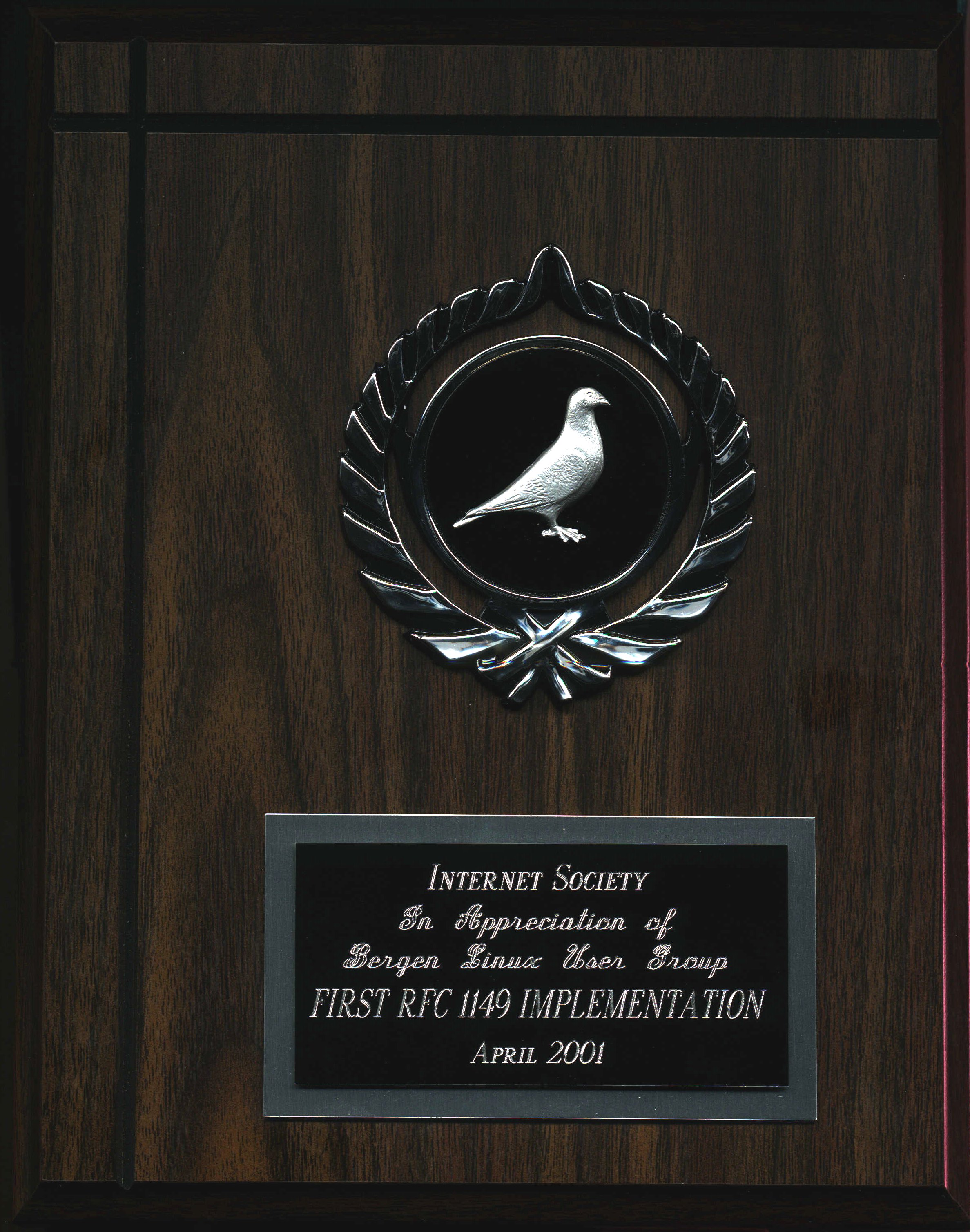
The IETF RFC1149 implementation plaques

There were even some art projects that referenced our implementation, and I think even some that reused the pictures that were available on the BLUG RFC1149 web. (An archived copy of the original site can be found here).


The notes in full prose form end there. I was likely in a hurry to catch a plane, but I mention (as I do in the slides) that we had at least thought of some followup work:

	
Future developments

* more implementations
       needed to get on the Standards track
* Interspecies handoff protocols - relay runners?
      

In 2011, I wrote a short commemorative article, RFC1149: Ten Years of In-Flight Internet (also here) to note the ten year anniversary, where I noted that

The CPIP WG activities have proceeded at a more leisurely pace in recent years. In 2005 I went to the AUUG 2005 conference to do an early version of the PF tutorial, and en route I made a presentation in Adelaide about the project (slides and accompanying notes are still avaliable).

We're still looking for independent, interoperable implementations, though. Preferably on other free operating systems besides Linux. If we can entice our old pigeon partners to participate, we're more than willing to arrange for interoperability tests.

The world needs this to be on the IETF Standards Track.

Soon after the ten years mark, we did some re-enactments, with people (mainly children) acting as packet carriers, but I have been unable to find any resources about these events available on the web.

Again, independent implementations for other free operating systems would be most welcome, and the original implementers are still available and willing to participate in any interoperability tests.


The implementation of the Carrier Pigeon Internet Protocol, RFC1149, 25 years later is © 2026 Peter N. M. Hansteen (published 2026-04-25)
You might also be interested in reading selected pieces via That Grumpy BSD Guy: A Short Reading List (also here).

Friday, November 7, 2025

What is BSD? Come to a conference to find out!

© 2025, 2026 Peter N. M. Hansteen

What is BSD? It's where the Internet comes from!

Berkeley Software Distribution (BSD) is a family of computer operating systems derived from the software developed at the University of California at Berkeley from the late 1970s through the early 1990s.

You may or may not be aware that the BSD code still powers a lot of things, and we meet up regularly for conferences. More about conferences later, first a little history to set the context.

A short history of the BSD operating systems

The history of the BSD family of operating systems is to a large extent the history of the Internet itself. You may have heard of the time back in the 1980s when the likes of IBM and Digital were slugging it out in the corporate IT sphere and the US department of defence paid for experiments in distributed, device independent networking.

That's when a loosely organized group of hackers somewhat coordinated by researchers at University of California's Berkeley campus rose to prominence with "BSD Unix", which by a sequence of happy accidents became the home of the reference implementation of the TCP/IP internet protocols.

By the early 1990s, commercialization of the Internet had started, and the Berkeley Computer Science Research Group (CSRG) that had coordinated the efforts was set to be disbanded. In addition to the net itself, the main tangible product out of Berkeley was the Berkeley Software Distribution (BSD), often distributed on tapes in the mail but also available on the net itself, which had started as a collection of software for AT & T's Unix but had over the years been extended become a full featured Unix operating system.

Several different groups wanted BSD to go on even if the CSRG did not, and several things happened in fairly rapid succession:

  • Lynne and Bill Jolitz ported BSD to Intel x86 (actually 80386sx), creating 386BSD. This was chronicled in a series of articles in Dr Dobbs' Journal (also see a more condensed summary over at salon.com)
  • Next up, hackers started sharing improvements to the 386BSD code as "patchkits", eventually forming two separate groups that took the work further to form their projects: The FreeBSD group would be working on bringing the best possible BSD to PC-style hardware, while the NetBSD group's ambition was to make BSD run on any hardware they could get their hands on.
  • A group of former CSRG employees formed BSDi Inc. and marketed their product BSD/386 with among other things a contact phone number "1-800-ITS-UNIX". The activities of an actual corporation in turn triggered a lawsuit from the owners of the UNIX trademark over code copyrights.

The lawsuit was eventually settled -- only six files of several thousand in the tree were 'potentially encumbered' and had to be replaced, leaving both NetBSD and FreeBSD with a rush to replace the code which was at least in part fairly central to the virtual memory subsystem.

That episode was however just a temporary setback, and by 1996 we also had OpenBSD, which forked off the NetBSD code base and formed the third main member of the BSD family, with a stated purpose to focus on security and correct code. Finally in 2003, the DragonFly BSD project forked off the FreeBSD code and became the fourth member of the family of open source BSD operating systems.

Code from the BSDs is widely used in Internet infrastructure and in numerous not too obvious contexts. In fact, all devices with TCP/IP Internet capability ran some derivative of the BSD code until alternative implementations started appearing during the early 2000s.

The likely most popular BSD variant is Apple's macOS, which shares a huge amount of code with the FreeBSD project. Modern BSD systems include DragonFly BSD, FreeBSD, NetBSD, OpenBSD, and, by some counts, Apple's macOS.

BSD code continues to be the base, however largely unsung, of significant technology development wherever the Internet is relevant. And you can even meet developers and practitioners at regional conferences every year!

The annual, regional BSD conferences

Most of the time, the development of the BSD systems is done by developers working by themselves or in small groups, in locations all over all inhabited time zones. However, by the early 2000s, a number of individuals in the various BSD communities started seeing the need for in-person meetups.

In addition to some projects calling up developers for hackathons, pioneered by the OpenBSD project, or developer summits, groups of interested parties including individual users and organizations started meeting up for conferences. The main regularly arranged BSD conferences are,

  • AsiaBSDCon, March timeframe, has alternated between Tokyo (JP) and Taipei (TW). AsiaBSDCon 2026 was March 19-22, 2026 in Taipei, Taiwan. AsiaBSDCon 2027 will be in Singapore, dates and specifics to be announced.
  • BSDCan, Mid May to mid June, Ottawa (CA). BSDCan 2026 will be June 17-20 in Ottawa, Canada.
  • EuroBSDcon, September timeframe, each year in a new European city. EuroBSDCon 2026 will be September 10-13 in Brussels, Belgium.

All three conferences will welcome submissions for talks, tutorials and other types of sessions as well as general participation by people regardless of geographic or other origin.

For further information, browse the conference websites.

We hope to see you there at future events!

Further reading

Explaining BSD on the FreeBSD documentation site

What every IT person needs to know about OpenBSD (part 1) at the APNIC blog site, continued in part 2 and part 3

DragonFly BSD project website

FreeBSD project website

NetBSD project website

OpenBSD project website


Historic project art follows: Left to right: OpenBSD, FreeBSD and NetBSD

puffy with so long and thanks for all the fish FreeBSD mascot Beastie as drawn by Poul-Henning Kamp The original NetBSD logo


Thursday, September 18, 2025

EU CRA: It's Later Than You Think, Time to Engineer Up!

© 2025 Peter N. M. Hansteen

On December 12 2027, it's already too late. The day before, the European Union Cyber Resilience Act (CRA) will have fully entered into force.

On December 11 2027, the Cyber Resilience Act is fully in force in the European Union member states and associated countries and territories.

From that date onward, suppliers of any "product with digital elements" are required to present those products along with a full overview and insight into all components and dependencies that went into making that product.

Unless, of course, you are a supplier that is fine with being considered at best second rate, or even being ineligible for lucrative contracts. Selling product that has not qualified for the CE mark for its product category will simply not do.

The European timeline for phased implementation of the CRA is outlined here, among other places.

Even if you are on the other side of the pond, you're not out of the woods. But more on that later.


Note: This piece is also available without trackers but classic formatting only here.

Upping Your Engineering Game

For individual developers, the question becomes something more along the lines of "Do you know what your code does?", or even "Do you know everything your code does?".

To put it bluntly, whether you answer to either of these is a clear yes or no determines whether you are just a coder or an engineer who codes.

The purpose of this session is to help you move towards becoming the latter. To start you upping your engineering game.

To set the stage for what real engineers (should) do and to keep focus on the importance of doing things right, the anecdote of the Canadian engineers' iron ring is a useful reference.

This all sounds a bit harsh, I know. So we will go a little softer at first, much like I did in my earlier article No Project Is an Island: Why You Need SBOMs and Dependency Management.

And yes, some of this will sound familiar if you have taken in that piece or participated in the live sessions based on the text.

Dear Developer, do you know what your code does?

So let's ask the question,

Dear developer, do you know what your code does?

Your answer is likely to be along the lines of

Sure, I wrote it all. I know what it does.

Unless you vibe coded the thing, that is. But let's leave that particular set of circumstances for another time.

The answer I wrote it all. I know what it does is, however, unlikely to be totally accurate. Unless you are doing extremely low level stuff and your code speaks directly to the hardware, your code more likely than not also pulls in and utilizes dependencies such as system calls and library functions that provide the foundation of functionality that makes the code you wrote work.

Knowing your dependencies and what role they plain in making your code work is a significant part of delivering proper quality. More on that later. First, we turn to a little history of software.

Just a Bit of Typing

Software is a relatively recent phenomenon. For a long time, you could credibly say most of its existence, software was poorly understood by society and industry at large.

There was a time -- and I am old enough to remember that time -- when software was considered a minor, somewhat irritating but necessary, component in IT deliveries.

On the more extreme end of things, you would occasionally hear that software was not at all important, literally just a bit of typing.

All the while it was ever more clear to developers and practitioners that the software was what made all that expensive hardware useful. But software was all ephemereal to most and in almost all cases the source code was secret, and the customer was expected to just accept whatever came you way as-is.

That perception changed over time, and during recent decades it is no longer in doubt that the software industry is just that, an industry in its own right.

But Then Suddenly Software Turned Important

Then, as some of us still remember, the Internet happened.

Few people realized it at the time, but this was the time in history when two important things happened at roughly the same time.

For one, it became obvious to developers at least that the infrastructure we all have come to rely upon owes its strength and resilience to the fact that it consists mainly of software that was built on standards built on rough consensus and working code, code that was open source.

The other thing was that software faced the full force of the entire world banging away at their keyboards.

Some of those keyboards were operated by people who intended to do bad things.

And eventually, bad things started happening.

Over the years, eventually enough episodes piled up that software security, sometimes discussed under other labels, started becoming an issue.

During the twenty-tens and -teens, we had several incidents where software bugs were tickled enough to lead to costly and embarrasing episodes. Some of these episodes were grave enough that the powers that be (the kind wearing suits) discovered that software was indeed something they needed to care about.

These episodes spurred several things, one being memes like

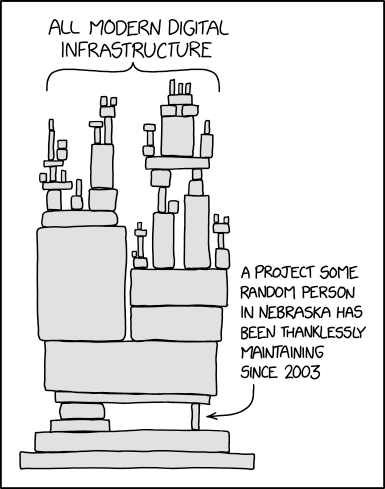
(XKCD #2347, please also read the explainer), which lead to the common belief that supply chain management and the subtopic dependency management is mainly a problem that concerns open source software.

This assertion is simply not true, in that no project is an island.

Whether you let others see the code you wrote or not, the software does not exist in isolation.

The XKCD comic struck a chord with open source developers, who at the time were a lot more in tune with the world of software dependencies than most other people.

Dependencies Became A Thing

There were several high profile and scary security incidents during the twenty-tens and twenty-teens. Some were due to exploitable and exploited bugs in open source code and dependencies, such as the log4shell incident involving a very popular logging library. This incident served to make it clear to C-level executives that dependencies were indeed a thing, and that their infrastructure was to a large extent made up of open source software.

At roughly the same time, the SUNBURST supply chain incident, which involved a popular piece of proprietary network management software that had been backdoored, demonstrated that even when the source code is kept secret, that is not sufficient protection against skilled adversaries.

These and other grave incidents made supply chain security an important new addition to our software security vocabulary.

No Project Is an Island

As I mentioned earlier, no project is an island.

Whether you let others see the code you wrote or not, the software does not exist in isolation.

Summing up so far,

  • We write software
  • Which depends on other software
  • Which interacts with other software
  • Which again interacts with other components (hardware, humans)
  • To run important stuff
  • Nothing exists in actual isolation – No project is an island

So what we do is important. What do we do about that?

Learn From Those Who Build Important Things

One way to handle the situation is to look at what other people who build important things do.

In other fields, the term Bill of Materials, or BOM for short, is a familiar term. The Bill of Materials is a document or set of documents that lists all component parts of a delivery.

This is the kind of document that becomes crucial in contexts where the procuring organization is geared toward accounting for everything and auditing when the supplier least expects it.

One such context could be when your organization has landed a contract to supply a backhoe, an armored personnel carrier or even a ship, and the contract requires you to specify component materials used, down to the nuts and bolts level.

For an example of the scale of things we are talking about, consider this ultra high level view of an item that was delivered to the UK Royal Navy, one aircraft carrier HMS Queen Elizabeth:

Aircraft carrier HMS Queen Elizabeth, exploded view

Your delivery would not be considered complete without the Bill of Materials or Manifest, even for a thing this size.

In practice, the BOM for the HMS QE and similar-sized projects would be a collection of BOMs with specifications for each of the multitude of component deliveries that make up the whole. Each supplier would be required to come up with a Bill of Materials for their delivery.

For physical deliveries to organizations of some stature, a Bill of Materials has been a standard part of the process across industries as an important part of quality assurance and a fundamental part of maintenance processes.

Software, on the other hand, has traditionally not been subject to that kind of scrutiny.

What Do Engineers Do?

In other fields of engineering, the process runs roughly like this:

You design your product, make detailed plans and descriptions of how to build the thing.

While planning and building, you keep track of all parts and components.

A Bill of Materials (BOM) for a pump that could well be a part of the HMS Queen Elizabeth could look like

Screenshot of a Bill of Materials (BOM) foar a boat pump, possibly part of a larger delivery

Your plans and design documents will likely undergo changes during product development and assembly.

For each delivery, you create a Bill of Materials that is a required and essential part of the delivery.

The Bill of Materials (BOM) lists all component parts, to the detail level required for running maintenance.

The BOM typically also references and serves as reference for maintenance documentation.

As an aside, it is likely worth noting that the US Department of Defense's need for structured text markup in processing inventory information such as bills of materials was one of the more important drivers, albeit not the only one, behind the creation of SGML, the direct precursor to HTML and XML.

Again, for a long time, this kind of engineering practice was not seen as a requirement for software deliveries.

Libre Software Has Package Management Already

Handling dependencies in software is not a new thing. You probably poke around for dependencies yourself when you start looking into a new project.

You will start looking into the source code files in your project, any libraries or tools needed to build the thing would be nice-to-knows. Once you have the thing built, it becomes interesting to know what other things -- libraries, suites of utilities, services that are required to be running or other software frameworks of any kind -- that are required in order to have the thing run.

So basically, any item your code would need comes out as a dependency, and you will find that your code has both build time and run time dependencies.

Those terms will be quite familiar to users and the developers of the package manager systems for the various open source operating systems. The very same items you would recognize from a listing of package dependencies in a package management tool will turn up in our Software Bill of Materials too. Depending on the specific tool and options you use, the SBOM could contain additional information that may not be entirely relevant in a package manager context.

Under any circumstances, with package systems in place, and even vulnerability scanners available to scan for unsecure code at rest or while running, the free and open source software communities were in fact well positioned for the legal requirements when they hit. Even more, the lessons learned from package management came in quite useful in meeting and satisfying the updated requirements.

Every free operating system, and in fact most modern-ish programming languages come with a package system to install software and to track and handle the web of depenencies. You are supposed to use the corresponding package manager for the bulk of maintenance tasks.

So when the security relevant incidents hit, the open source world was fairly well stocked with code that did almost all the things that were needed for producing what became known as Software Bill of Materials, or SBOM for short.

Introducing: A Software Bill of Materials (SBOM)

So what would a Software Bill of Materials even look like?

Obviously nuts and bolts would not be involved, but items such as the source code files in your project, any libraries or tools needed to build the thing would be nice-to-knows. And once you have the thing built, it becomes interesting to know what other things -- libraries, suites of utilities, services that are required to be running or other software frameworks of any kind -- that are required in order to have the thing run.

The information is there in our code, and with development tools and code scanners a developer is well placed to poke around.

The next challenge it to take that information and present it in a way that conforms with the legal specification and is presented in a way that is usable for stakeholders that are not developers.

In addition to module or package names and versions, the expected SBOM product will be an extremely useful tool for keep in track of any identified security problems such as CVEs and a specification of the licenses that apply to each of the identified dependencies.

Thanks in large measure to the open source heritage of the specifications and tools, both of the commonly used SBOM specifications (SPDX and CycloneDX) consider information on licenses used in a file or project as tagging and tracking relevant items.

The tools we describe have some measure of support for tracking and reporting on licenses in use. This can be useful for flagging licenses that may be mutually incompatible or even incompatible with your organization's business goals.

Several pieces of legislation emerged from the at times panic flavored fallout from the security incidents. Which ones are more relevant to you will become clear as we move on.

Depending on what parts of the world you care more about, the emphasis will either be on

So that's our backdrop for now.

Mainly (I think) due to coordinated lobbying by major players, both have rougly the same time frames for becoming formal requirements, with the EU Cyber Resilience Act (CRA) entering fully into force, with a CE mark scheme for digital products to be in place with the same deadline.

The name of the SBOM game is compliance with those legal requirements, and to not only generate the information -- that's the relatively easy part -- but also to present the information in a way that is understandable and actionable to stakeholders who are not themselves software developers.

We're Real Engineers Now, Sparky! We Have Tools

As I hinted at earlier, there are tools available for all of this. If you want to go on and explore for yourself, I would recommend going to the awesome-sbom site, which offers a curated collection of SBOM resources and tools hosted as a Github repo.

There are a large number of tools available, with varying feature sets. In addition to the free tools you find via that collection, several tool suites exist that are exclusively commercial or with free trial or reduced features set versions out with full features available only to paying customers.

The tool set I found the most accessible for my poking around was the combination of syft for generating SBOMs and bomber for display and presentation. The home pages for both are linked from the awesome-sbom collection.

As you can see from that page, there are several SBOM formats around, and to some extent standardization and interoperability efforts are under way. But enough of that, let's look at the actual tools in use.

Tools and How To Use Them

The tool set I found the most accessible for my poking around was the combination of syft for generating SBOMs and bomber for display and presentation. The home pages for both are linked from the awesome-sbom collection.

As you can see from that page, there are several SBOM formats around, and to some extent standardization and interoperability efforts are under way. But enough of that, let's look at the actual tools in use.

As a first step, it is instructive to point syft at the base directory of your project and see if it can tell you something you did not know already. syft supports a number of output formats, so if XML is the more readable format to you,

$ syft . -s all-layers -o cyclonedx-xml | xq

will give you pretty-printed XML (assuming you have xq installed) output of what syft found out. Do explore the various command line options for extracting various information about your project.

If you prefer JSON over XML, something like

$ syft . -s all-layers -o cyclonedx-json | jq

will give you readable JSON of the same information. Again, there are a number of options to explore.

If you want an html report with known vulnerabilities

$ syft . -o cyclonedx-json | bomber scan --provider ossindex --output=html

Note: For this particular command to work, you also need to supply provider login credentials (available with free registration), see the Bomber provider documentation.

Your SBOM, The Build Artifact

When you have explored a bit, you may want to look into how you incorporate these tools in your project and make the SBOM a build artifact.

The bomber documentation has this example suggestion for inclusion in a CI/CD pipeline:

# Make sure you include the - character at the end of the command.
# This triggers bomber to read from STDIN
syft packages . -o cyclonedx-json | bomber scan --provider ossindex --output json -

Note: For this particular command to work, you also need to supply provider login credentials (available with a free registration), see the Bomber provider documentation.

For your own projects you will tweak to taste, of course.

Your Tools May Already Have (Some of) This

More SBOM-savvy co-stakeholders in your project may even be capable of processing your json or xml formatted SBOMs themselves, using tools of their choice.

Your project and customer may already have chosen a different toolset, or you may find that some other SBOM generating and presentation tool set are better matches for your requirements.

It is in fact conceivable that you have SBOM-capable tools within reach in your environment already. The fairly popular images-and-sundry repository system Harbor supports automatic SBOM generation on image push by hooking in trivy for image scanning duty, should you choose to enable that feature for your Harbor hosted projects.

Track Your Dependencies On The Fly

In a real world scenario, I could imagine that non-developers would appreciate it if you supplement that line with one using the --output=html option. The HTML output provides a report that lists licenses involved before listing know vulnerabilites by severity and assigned CVE.

While I was writing this article, a colleague who had been reviewing it told me of an episode that shows that even extremely basic use of the SBOM tools can be useful. A customer had called, saying they needed a complete list of tools and dependencies involved in a project, and right away. As a first step, my colleague cd'ed in to the main directory of one of the subprojects for that customer, and issued the command

$ cdxgen .

and was rewarded with a bom.json file that listed somewhere in excess of three hundred dependencies for that relatively minor subproject alone. The customer was suitably impressed and granted my colleague a more realistic and less immediate time frame for submitting the full dependency tree.

There Is More

If you want to explore further, please dive into the resource references at the end here.

For the more Bill of Materials savvy developers who want to explore even more, it may be of interest that the OWASP and SPDX teams are working on more specialized BOM variants, including

  • OBOM (Operating system Bill of Materials)
  • SaaSBOM (Software as a Service Bill of Materials)
  • CBOM (Cryptography Bill of Materials)
  • AISBOM (Artificial Intelligence Bill of Materials)
and several more. Again, see the referenced resources at the end here and follow the breadcrumbs.

Now It's Your Turn: Get The Tools

Now it's your turn to go exploring. The first item is to get the tools installed.

If you haven't already, go to the home pages of each:

And follow the instructions on how to install for your environment.

The exact steps to install depends, of course, on your platform.

If you are running a recent Linux distribution, you more likely than not have them within reach via your package system. Failing that, or if you happen to be on macOS or a supported Linux, the command

$ brew install $toolname

where the value of toolname expands to the name of the tool you want will get you there.

There are even instructions for Microsoft systems at some of the tools' home pages.

If none of these methods work, do a git clone of the tool source code (you were going to do that anyway, right?) and follow the build instructions.

If necessary, tweak to get the thing to work. If you find you need to do something non-trivial to make the tool build and run on your system, consider submitting a pull request to the project.

Tools in Hand, Dig Into a New Project

Now that you have to tools installed, it is time to put them and your own skills to work on some actual source code.

If you have the source for a project you are already familiar with available, or a project you are interested in exploring, choose that. Otherwise, find something you're interested in on Github or somewhere else public.

Once you have a local copy of the codebase, go to that directory.

Once there, start with

$ cdxgen .

then watch the output (it may be useful to run commands like these in a script(1) session so you can look up what happened in the script file later), and act upon it.

Be prepared that there may be issues in the code that needs fixing or some dependency that you were not aware of.

Then look up the cdxgen, syft and bomber documentation to find out the following about your chosen code base:

  • What is the number of dependencies for this code base? How many direct dependencies? How many indirect ones (dependencies of dependencies)?
  • Does the code base itself have any known problems, reported as CVEs? How many for the dependencies?

If you are feeling a bit more ambitious, you could try checking out the tools themselves, and run the tools on those codebases:

Fetching cdxgen source code is as easy as

$ git clone git@github.com:CycloneDX/cdxgen.git

There may be some challenges ahead. If the result of your first session looks like this (an actual script session of cdxgen run on its own source), please do not let that discourage you. Those are problems to be fixed, and you are developer enough to do that, right?

for syft, the command is

$ git clone git@github.com:anchore/syft.git

and for bomber,

$ git clone git@github.com:devops-kung-fu/bomber.git

You may find other tools, via awesome-sbom or elsewhere, that fit your tastes or your projects better than those.

This is when the fun part starts.

Resources for Further Reading

Linux Foundation Training:
Automating Supply Chain Security: SBOMs and Signatures (LFEL1007) a short but information- and reference-filled introduction (free, requires registration, gives you a badge at the end)
Understanding the EU Cyber Resilience Act (CRA) (LFEL1001) Focused on the EU CRA, gives an overview with lots of useful references, nominally a 1 hour course worth taking

European Union Cyber Resilience Act (CRA) resources page at the Open Source Security Foundation (OpenSSF)

The Software Bill of Materials home page at NTIA is the mother ship of SBOM documentation

Browse OWASP CycloneDX for all things about the CycloneDX specification and related tools, also their CycloneDX tool center

Browse the System Package Data Exchange specification (SPDX) for all things SPDX (supported by the Linux Foundation), including copious linked reference material

awesome-sbom is a curated list of SBOM tools and resources

Awesome CRA Compliance is a curated list of CRA compliance resources

EU residents will want to poke around the Cyber Resilience Act site for reference

Brewing Transparency: How OWASP's TEA Is Revolutionizing Software Supply Chains is a summary of recent work on OWASP Transparency Exchange API (TEA)

SBOM buyer’s guide: 8 top software bill of materials tools to consider is a readable overview of (some) SBOM tools

Olle Johansson's FOSDEM presentations are among several good SBOM talks at that conference (search the site for more)

Peter N. M. Hansteen: Open Source in Enterprise Environments - Where Are We Now and What Is Our Way Forward? (2022, also here) has some insights on how open source software plays a crucial role in enterprise environments and elsewhere

Peter N. M. Hansteen: No Project Is an Island: Why You Need SBOMs and Dependency Management (also here)

Peter N. M. Hansteen: EU CRA: It's Later Than You Think, Time to Engineer Up! (this article) (also here)

Peter N. M. Hansteen: EU CRA: It's Later Than You Think, Time to Engineer Up! (slides)


EU CRA: It's Later Than You Think, Time to Engineer Up! is © 2025 Peter N. M. Hansteen (published 2025-09-18)

Peter N. M. Hansteen: What has (can) the EU Cyber Resilience Act done (do) for you? (also here, slides)


You might also be interested in reading selected pieces via That Grumpy BSD Guy: A Short Reading List (also here).

Sunday, May 25, 2025

That Grumpy BSD Guy: A Short Reading List

© 2025 Peter N. M. Hansteen

A collection of pointers to things I have written and that I think may be of value to you too, my fellow geek friend

I was recently (late May of 2025) asked to provide a list of things I have written over the years that would be suited to offer useful insights to someone not familiar with my work or the field(s) I cover.

In addition to the book I wrote and have revised when the time seemed right, I have written the odd blog post over the years, and this is the list I came up with, in roughly reverse chronological order:


Note: This piece is also available without trackers but classic formatting only here.

EU CRA: It's Later Than You Think, Time to Engineer Up! (2025) -- A call for stepping up to real, good engineering practices in software development and maintenance, with a slight emphasis on the fact that by the end of 2027, there will be legislation in force that will in fact compel the industry to act. Expands on the earlier No Project Is an Island: Why You Need SBOMs and Dependency Management (2025) with a view to performing an introductory workshop for working or aspiring developers and devops/sysadmins. And perhaps even their suits-clad managers.

For Upcoming PF Tutorials, We Welcome Your Questions (2025) -- I have been giving PF tutorials for about 20 years, for the last few years in cooperations with Max Stucchi and Tom Smyth. This piece was written to encourage questions and other input while we are preparing for the BSDCan 2025 session, which we are still working on preparing as I write. However, we always welcome your input and we have provided contact information in the piece itself. Also available tracked, prettified.

Eighteen Years of Greytrapping - Is the Weirdness Finally Paying Off? (2025) -- A long-running experiment, started all the way back in 2007, with the intent to make undesired activity less desirable to engage in, reached a milestone of sorts. That event I considered significant enough that I finally wrote that retrospective some of my readers and correspondents had been asking me to do for some time. Also available tracked, prettified.

No Project Is an Island: Why You Need SBOMs and Dependency Management (2025) -- This piece is really about software engineering coming to grips with what real world engineering is all about. The world, or parts of it, finally decided that we could no longer consider software "just a bit of typing", and we are answering the challenge by leveraging lessons learned by working on free software. A further evolved version could turn up at future public events. Also available tracked, prettified.

A Suitably Bizarre Start of the Year 2025 (2025) -- Because, well, the time around the start of the year showed up a few truly bizarre things, a surge in truly nonsensical spamming activity being one item. The number of imaginary friends collected has kept up the pace, see links in the piece itself for up to date information. Also available tracked, prettified.

You Have Installed OpenBSD. Now For The Daily Tasks. (2024) -- I am much indebted to Solène Rapenne for pointing out to me that two earlier pieces I had written about life with OpenBSD were, while not actually wrong, just quite a bit out of date. This piece recitifies that situation, and provides some basic advice for day to day life with our favorite operating system. Also available tracked, prettified.

Three Minimalist spamd Configurations for Your Spam Fighting Needs (With Bonus Points at the End) (2024) -- Fresh off writing his excellent mail server book, Michael W. Lucas posted a thing on the Mailop list that had me write a short piece on domain-only trapping (linked in this one), and after a quick think, also this piece that offers other minimalist but actually usual configurations. Also available tracked, prettified.

The Despicable, No Good, Blackmail Campaign Targeting ... Imaginary Friends? (2022) -- A follow-up to an earlier piece on the embarrasment-based extortion spamming campaigns we had been seeing for some years. This piece makes a hopefully clearer case than the previous one that the potentially embarrasing video material the messages claim exist most likely does not. After all, multiple thousands of addresses that have been known to never have existed are targets of these campaigns, swelling temporarily the list of greytrapped hosts. Also available tracked, prettified.

A Few of My Favorite Things About The OpenBSD Packet Filter Tools (2022) -- The good people at SEMIBUG asked me to give a PF talk for one of their user group meetings. This is the writeup for that talk, with links to slides and other material. Very much colored by my tastes, but hopefully useful. Also available tracked, prettified.

Badness, Enumerated by Robots (2018) -- Way back when, I started setting my systems to collecting IP addresses that were the source of undesirable activity and publishing updated lists at intervals. That activity stayed useful for longer than I had anticipated, and at some point I wrote this summary of what those systems do, with references to other resources, of course. Also available tracked, prettified.

Maintaining A Publicly Available Blacklist - Mechanisms And Principles (2013) After running the greytrap-based blocklist for some years, I felt the need to explain my thinking about the hows and whys. The first paragraph sums it up,

When you publicly assert that somebody sent spam, you need to ensure that your data is accurate. Your process needs to be simple and verifiable, and to compensate for any errors, you want your process to be transparent to the public with clear points of contact and line of responsibility.

-- Also available tracked, prettified.

Yes, You Too Can Be An Evil Network Overlord - On The Cheap With OpenBSD, pflow And nfsen (2014) -- "Have you ever wanted to know what's really going on in your network? Some free tools with surprising origins can help you to an almost frightening degree.". Yes, with tools that are either part of OpenBSD or within easy reach via the package system, you only need to put in rather modest efforts to reveal deep truths about the life on your network. Also available tracked, prettified.

Effective Spam and Malware Countermeasures - Network Noise Reduction Using Free Tools (2014) -- Originally a BSDCan paper from the late noughties, with emphasis on the exploit mitigation techniques in OpenBSD and how to leverage them in the effort to limit or even get rid of spam and malware. Even after all those years, some aspects of this text are still quite relevant. This piece has seen occasional updates as indicated by the copyright line. Also available tracked, prettified.

The Hail Mary Cloud And The Lessons Learned (2013) -- The Hail Mary Cloud was a widely distributed, low intensity password guessing botnet that targeted Secure Shell (ssh) servers on the public Internet. The first activity may have been as early as 2007, but our first recorded data start in late 2008. This summary article describes the botnet activities and countermeasures as well as offering some more forward-looking statements about Internet security. Also available tracked, prettified.

Those, I said to my correspondent, are likely the more interesting entries.

If you have read this far and found something useful or enlightening by visiting the linked items, that will make me happy to have turned some Sunday afternoon procrastination into something useful to others. And I have this to offer as a bonus for your perseverance:

I have also been a guest blogger at blog.apnic.net:

What every IT person needs to know about OpenBSD (2021) in three parts, starting with What every IT person needs to know about OpenBSD Part 1: How it all started (also the original in one piece, What every IT person needs to know about OpenBSD (tracked, prettified), and

A few of my favourite things about the OpenBSD Packet Filter tools (2022) also ran as a two part series at APNIC, starting with A few of my favourite things about the OpenBSD Packet Filter tools (part 1) and A few more of my favourite things about the OpenBSD Packet Filter tools (part 2)


Upcoming events:

Ottawa, Canada: BSDCan 2025 has tutorials June 11-12, 2025 and talks June 13-14. A new version of Network Management with the OpenBSD Packet Filter Toolset will go ahead there.

A little later on in 2025, the EuroBSDcon 2025 conference is still accepting submissions for papers and tutorials, so if you have an interesting BSD-related topic you want the world to know about, your submissions will be welcome at the EuroBSDcon submissions system, where the deadline is 2025-06-21, or June 21st, 2025 (full disclosure: I'm on the program committee). This year's conference is set in beautiful Zagreb, Croatia in late September.

At EuroBSDcon 2025, there will be a Network Management with the OpenBSD Packet Filter Toolset session, a full day tutorial starting at 2025-09-25 10:30 CET. You can register for the conference and tutorial by following the links from the conference Registration and Prices page.

Separately, pre-orders of The Book of PF, 4th edition are now open. For a little background, see the blog post Yes, The Book of PF, 4th Edition Is Coming Soon. We are hoping to have physical copies of the book available in time for the conference, and hopefully you will be able to find it in good book stores by then.


Thursday, March 13, 2025

No Project Is an Island: Why You Need SBOMs and Dependency Management

© 2025 Peter N. M. Hansteen

The system you develop and maintain does not exist in isolation. Providing SBOMs for our work is our way to show we care.

Software is a relatively recent phenomenon. For a long time, you could credibly say most of its existence, software was poorly understood by society and industry at large.

There was a time -- and I am old enough to remember that time -- when software was considered a minor, somewhat irritating but necessary, component in IT deliveries. That perception changed over time, and during recent decades it is no longer in doubt that the software industry is just that, an industry in its own right.

Note: This piece is also available without trackers but classic formatting only here.

What we did not have at all until recently was a set of formal requirements to verifiably show what it is we deliver.

In other fields, the term Bill of Materials, or BOM for short, is a familiar term. The Bill of Materials is a document or set of documents that lists all component parts of a delivery.

This is the kind of document that becomes crucial in contexts where the procuring organization is geared toward accounting for everything and auditing when the supplier least expects it.

One such context could be when your organization has landed a contract to supply a backhoe, an armored personnel carrier or even a ship, and the contract requires you to specify component materials used, down to the nuts and bolts level.

Your delivery would not be considered complete without the Bill of Materials or Manifest.

As an aside, it is likely worth noting that the US Department of Defense's need for structured text markup in processing inventory information such as bills of materials was one of the more important drivers, albeit not the only one, behind the creation of SGML, the direct precursor to HTML and XML.

For physical deliveries to organizations of some stature, a Bill of Materials has been a standard part of the process across industries as an important part of quality assurance and a fundamental part of maintenance processes.

Software, on the other hand, has traditionally not been subject to that kind of scrutiny.

Until software that made critical infrastructure work broke, that is.

During the twenty-tens and -teens, we had several incidents where software bugs were tickled enough to lead to costly and embarrasing episodes, and the powers that be (the kind wearing suits) discovered that software was indeed something they needed to care about.

These episodes spurred several things, one being memes like

(XKCD #2347, please also read the explainer), which lead to the common belief that supply chain management and the subtopic dependency management is mainly a problem that concerns open source software.

This assertion is simply not true, in that no project is an island.

Whether you let others see the code you wrote nor not, the software does not exist in isolation.

All software has dependencies, and in the open source world this fact has been treated as a truth out in the open. Every free operating system, and in fact most modern-ish programming languages come with a package system to install software and to track and handle the web of depenencies, and you are supposed to use the corresponding package manager for the bulk of maintenance tasks.

So when the security relevant incidents hit, the open source world was fairly well stocked with code that did almost all the things that were needed for producing what became known as Software Bill of Materials, or SBOM for short.

So what would a Software Bill of Materials even look like?

Obviously nuts and bolts would not be involved, but items such as the source code files in your project, any libraries or tools needed to build the thing would be nice-to-knows, and once you have the thing built, what other things -- libraries, suites of utilities, services that are required to be running or other software frameworks of any kind -- that are required in order to have the thing run are obvious items of interest.

So basically, any item your code would need comes out as a dependency, and you will find that your code has both build time and run time dependencies.

Those terms will be quite familiar to users and the developers of the package manager systems for the various open source operating systems. The very same items you would recognize from a listing of package dependencies in a package management tool will turn up in our Software Bill of Materials too. Depending on the specific tool and options you use, the SBOM could contain additional information that may not be entirely relevant in a package manager context.

Under any circumstances, with package systems in place, and even vulnerability scanners available to scan for unsecure code at rest or while running, the free and open source software communities were in fact well positioned for the legal requirements when they hit, and the lessons learned from package management came in quite useful in meeting and satisfying the updated requirements.

Several pieces of legislation emerged from the at times panic flavored fallout from the security incidents. Which ones are more relevant to you will become clear as we move on.

Depending on what parts of the world you care more about, the emphasis will either be on US Executive Order 14028 of May 12, 2021, Improving the Nation's Cybersecurity and its summaries found at the Software Bill of Materials Home page hosted by the National Telecommunications and Information Administration, or for the EU and our neighborhood, the EU Cyber Resilience Act (CRA) with slightly less hardcore legalese available at the Cyber Resilience Act start page.

So that's our backdrop for now. The name of the SBOM game is compliance with those legal requirements, and to not only generate the information -- that's the relatively easy part -- but also to present the information in a way that is understandable and actionable to stakeholders who are not themselves software developers.

The information is there in our code, and with development tools and code scanners a developer is well placed to poke around.

The next challenge it to take that information and present it in a way that conforms with the legal specification and is presented in a way that is usable for stakeholders that are not developers.

In addition to module or package names and versions, the expected SBOM product will typically include information on any identified security problems such as CVEs and a specification of the licenses that apply to each of the identified dependencies.

Thanks in large measure to the open source heritage of the specifications and tools, both of the commonly used SBOM specifications (SPDX and CycloneDX) consider information on licenses used in a file or project as tagging and tracking relevant items, and the tools we describe have some measure of support for tracking and reporting on licenses in use. This can be useful for flagging licenses that may be mutually incompatible or even incompatible with your organization's business goals.

As I hinted at earlier, there are tools available for all of this. If you want to go on and explore for yourself, I would recommend going to the awesome-sbom site, which offers a curated collection of SBOM resources and tools hosted as a Github repo.

There are a large number of tools available, with varying feature sets. In addition to the free tools you find via that collection, several tool suites exist that are exclusively commercial or with free trial or reduced features set versions out with full features available only to paying customers.

The tool set I found the most accessible for my poking around was the combination of syft for generating SBOMs and bomber for display and presentation. The home pages for both are linked from the awesome-sbom collection.

As you can see from that page, there are several SBOM formats around, and to some extent standardization and interoperability efforts are under way. But enough of that, let's look at the actual tools in use.

As a first step, it is instructive to point syft at the base directory of your project and see if it can tell you something you did not know already. syft supports a number of output formats, so if XML is the more readable format to you,

$ syft . -s all-layers -o cyclonedx-xml | xq

will give you pretty-printed XML (assuming you have xq installed) output of what syft found out. Do explore the various command line options for extracting various information about your project.

If you prefer JSON over XML, something like

$ syft . -s all-layers -o cyclonedx-json | jq

will give you readable JSON of the same information. Again, there are a number of options to explore.

When you have explored a bit, you may want to look into how you incorporate these tools in your project and make the SBOM a build artifact.

The bomber documentation has this example suggestion for inclusion in a CI/CD pipeline:

# Make sure you include the - character at the end of the command. This triggers bomber to read from STDIN
syft packages . -o cyclonedx-json | bomber scan --provider ossindex --output json -

In a real world scenario, I could imagine that non-developers would appreciate it if you supplement that line with one using the --output=html option. The HTML output provides a report that lists licenses involved before listing know vulnerabilites by severity and assigned CVE.

While I was writing this article, a colleague who had been reviewing it told me of an episode that shows that even extremely basic use of the SBOM tools can be useful. A customer had called, saying they needed a complete list of tools and dependencies involved in a project, and right away. As a first step, my colleague cd'ed in to the main directory of one of the subprojects for that customer, and issued the command

$ cdxgen .

and was rewarded with a bom.json file that listed somewhere in excess of three hundred dependencies for that relatively minor subproject alone. The customer was suitably impressed and granted my colleague a more realistic and less immediate time frame for submitting the full dependency tree.

More SBOM-savvy co-stakeholders in your project may even be capable of processing your json or xml formatted SBOMs themselves, using tools of their choice.

Your project and customer may already have chosen a different toolset, or you may find that some other SBOM generating and presentation tool set are better matches for your requirements.

It is in fact conceivable that you have SBOM-capable tools within reach in your environment already. The fairly popular images-and-sundry repository system Harbor supports automatic SBOM generation on image push by hooking in trivy for image scanning duty, should you choose to enable that feature for your Harbor hosted projects.

If you want to explore further, please dive into the resource references at the end here.

For the more Bill of Materials savvy developers who want to explore even more, it may be of interest that the OWASP and SPDX teams are working on more specialized BOM variants, including OBOM (Operating system Bill of Materials), SaaSBOM (Software as a Service Bill of Materials), CBOM (Cryptography Bill of Materials), and several more. Again, see the referenced resources at the end here and follow the breadcrumbs.

SBOM Resources

Linux Foundation Training:
Automating Supply Chain Security: SBOMs and Signatures (LFEL1007) a short but information- and reference-filled introduction (free, requires registration, gives you a badge at the end)
Understanding the EU Cyber Resilience Act (CRA) (LFEL1001) Focused on the EU CRA, gives an overview with lots of useful references, nominally a 1 hour course worth taking

The Software Bill of Materials home page at NTIA is the mother ship of SBOM documentation

Browse OWASP CycloneDX for all things about the CycloneDX specification and related tools, also their CycloneDX tool center

Browse the System Package Data Exchange specification (SPDX) for all things SPDX (supported by the Linux Foundation), including copious linked reference material

awesome-sbom is a curated list of SBOM tools and resources

EU residents will want to poke around the Cyber Resilience Act site for reference

Brewing Transparency: How OWASP's TEA Is Revolutionizing Software Supply Chains is a summary of recent work on OWASP Transparency Exchange API (TEA)

SBOM buyer’s guide: 8 top software bill of materials tools to consider is a readable overview of (some) SBOM tools

Olle Johansson's FOSDEM presentations are among several good SBOM talks at that conference (search the site for more)

Peter N. M. Hansteen: Open Source in Enterprise Environments - Where Are We Now and What Is Our Way Forward? (2022, also here) has some insights on how open source software plays a crucial role in enterprise environments and elsewhere

No Project Is an Island: Why You Need SBOMs and Dependency Management is this article (also here)

Sunday, September 25, 2022

A Few of My Favorite Things About The OpenBSD Packet Filter Tools

The OpenBSD packet filter PF was introduced a little more than 20 years ago as part of OpenBSD 3.0. We'll take a short tour of PF features and tools that I have enjoyed using.


NOTE: If you are more of a slides person, the condensate for a SEMIBUG user group meeting is available here. A version without trackers but “classical” formatting is available here.

At the time the OpenBSD project introduced its new packet filter subsystem in 2001, I was nowhere near the essentially full time OpenBSD user I would soon become. I did however quickly recognize that even what was later dubbed “the working prototype” was reported to perform better in most contexts than the code it replaced.

The reason PF's predecessor needed to be replaced has been covered extensively by myself and others elsewhere, so I'll limit myself to noting that the reason was that several somebodies finally read and understood the code's license and decided that it was not in fact open source in any acceptable meaning of the term.

Anyway the initial PF release was very close in features and syntax to the code it replaced. And even at that time, the config syntax was a lot more human readable than the alternative I had been handling up to then, which was Linux' IPtables. The less is said about IPtables, the better.

But soon visible improvements in user friendliness, or at least admin friendliness, started turning up. With OpenBSD 3.2, the separate /etc/nat.conf network adress translation configuration file moved to the attic and the NAT and redirection options moved into the main PF config file /etc/pf.conf.

The next version, OpenBSD 3.3, saw the ALTQ queueing configuration move into pf.conf as well, and the previously separate altq.conf file became obsolete. What did not change, however, was the syntax, which was to remain just bothersome enough that many of us put off playing with traffic shaping until some years later. Other PF news in that release included anchors, or named sub-rulesets, as well as tables, described as "a very efficient way for large address lists in rules" and the initial release of spamd(8), the spam deferral daemon.

More on all of these things later, I will not bore you with a detailed history of PF features introduced or changed in OpenBSD over the last twenty-some years.

PF Rulesets: The Basics

So how do we go about writing that perfect firewall config?

I could go on about that at length, and I have been known to on occasion, but let us start with the simplest possible, yet absolutely secure PF ruleset:

block

With that in place, you are totally secure. No traffic will pass.

Or as they say in the trade, you have virtually unplugged yourself from the rest of the world.

By way of getting ahead of ourselves, that particular ruleset will expand to the following:

block drop all

But we are getting ahead of ourselves.

To provide you with a few tools and some context, these are the basic building blocks of a PF rule:

verb criteria action ... options

Here are a few sample rules to put it into context, all lifted from configurations I have put into production:

pass in on egress proto tcp to egress port ssh

This first sample says that if a packet arrives on the egress — an interface belonging to the group of interfaces that has a default route — and that packet is a TCP packet with a destination service ssh, let the packet pass to the interfaces belonging to the egress interface group.

Yes, when you write PF rulesets, you do not necessarily need to write port numbers for services and memorize what services hide behind port 80, 53 or 443. The common or standard services are known to the rules parsing part of pfctl(8), generally with the service names you can look up in the /etc/services file.

The interface groups concept is as far as I know an OpenBSD innovation. You can put interfaces into logical groups and reference the group name in PF configurations. A few default interface groups exist without you doing anything, egress is one, another common one is wlan where all configured WiFi interfaces are members by default. Keep in mind that you can create your own interface groups — set them up using ifconfig(8) — and refer to them in your rules.

match out on egress nat-to egress

This one matches outbound traffic, again on egress (which in the simpler cases consists of one interface) and applies the nat-to action on the packets, transforming them so that the next hops all the way to the destination will see packets where the source address is equal to the egress interface's address. If your network runs IPv4 and you have only one routeable address assigned, you will more than likely have something like this configured on your Internet-facing gateway.

It is worth noting that early PF versions did not have the match verb. After a few years of PF practice, developers and practitioners alike saw the need for a way to apply actions such as nat-to or other transformations without making a decision on whether to pass or block the traffic. The match keyword arrived in OpenBSD 4.6 and in retrospect seems like a prelude to more extensive changes that followed over the next few releases.

Next up is a variation on the initial absolutely secure ruleset.

block all

I will tell you now so you will not be surprised later: If you had made a configuration with those three rules in that order, your configuration would be functionally the same as the one word one we started with. This is because in PF configurations, the rules are evaluated from top to bottom, and the last matching rule wins.

The only escape from this progression is to insert a quick modifier after the verb, as in

pass quick from (self)

which will stop evaluation when a packet matches the criteria in the quick rule. Please use sparingly if at all.

There is a specific reason why PF behaves like this. The system that PF replaced in OpenBSD had the top to bottom, last match wins logic, and the developers did not want to break existing configurations too badly during the transition away from the old system.

So in practice you would put them in this order for a more functional setup,

  block all
  match out on egress nat-to egress
  pass in on egress proto tcp to egress port ssh
    

but likely supplemented by a few other items.

For those supplementing items, we can take a look at some of the PF features that can help you write readable and maintainable rulesets. And while a readable ruleset is not automatically a more secure one, readability certainly helps spot errors in your logic that could put the systems and users in your care in reach of potential threats.

To help that readability, it is important to be aware of these features:

Options: General configuration options that set the parameters for the ruleset, such as

  set limit states 100000
  set debug debug
  set loginterface dc0
  set timeout tcp.first 120 
  set timeout tcp.established 86400 
  set timeout { adaptive.start 6000, adaptive.end 12000 }
  

If the meaning of some of those do not seem terribly obvious to you at this point, that's fine. They are all extensively documented in the pf.conf man page.

Macros: Content that will expand in place, such as lists of services, interface names or other items you feel useful. Some examples along with rules that use them:

  ext_if = "kue0" 
  all_ifs = "{" $ext_if lo0 "}" 
  pass out on $ext_if from any to any 
  pass in  on $ext_if proto tcp from any to any port 25
  

Keep in mind that if your macros expand to lists of either ports or IP addresses, the macro expansion will create several rules to cover your definitions in the ruleset that is eventually loaded.

Tables: Data structures that are specifically designed to store IP addresses and networks. Originally devised to be a more efficient way to store IP addresses than macros that contained IP addresses and expanded to several rules that needed to be evaluated separately. Rules can refer to tables so the rule will match any member of the table.

  table <badhosts> persist counters file "/home/peter/badhosts"
  # ...
  block from <badhosts>
      

Here the table is loaded from a file. You can also initialize a table in pf.conf itself, and you can even manipulate table contents from the command line without reloading the rules:

$ doas pfctl -t badhosts -T add 192.0.2.11 2001:db8::dead:beef:baad:f00d

In addition, several of the daemons in the OpenBSD base system such as spamd, bgpd and dhcpd can be set up to interact with your PF rules.

Rules: The rules with the verbs, criteria and actions that determine how your system handles network traffic.

A very simple and reasonable baseline is one that blocks all incoming traffic but allows all traffic initiated on the local system:

  block
  pass from (self)
      

The pass rule lets our traffic pass to elsewhere, and since PF is a stateful firewall by default, return traffic for the connections the local system sends out will be allowed back.

You probably noticed the configuration here references something called (self).

The string self is a default macro which expands to all configured local interfaces on the host. Here, self is set inside parentheses () which indicates that one or more of the interfaces in self may have dynamically allocated addresses and that PF will detect any changes in the configured interface IP addresses.

This exact ruleset expanded to this on my laptop in my home network at one point:

 $ doas pfctl -vnf /etc/pf.conf
   block drop all
   pass inet6 from ::1 to any flags S/SA
   pass on lo0 inet6 from fe80::1 to any flags S/SA
   pass on iwm0 inet6 from fe80::a2a8:cdff:fe63:abb9 to any flags S/SA
   pass inet6 from 2001:470:28:658:a2a8:cdff:fe63:abb9 to any flags S/SA
   pass inet6 from 2001:470:28:658:8c43:4c81:e110:9d83 to any flags S/SA
   pass inet from 127.0.0.1 to any flags S/SA
   pass inet from 192.168.103.126 to any flags S/SA

The pfctl command here says to verbosely parse but do not load rules from the file /etc/pf.conf.

This shows what the loaded ruleset will be, after any macro expansions or optimizations.

For that exact reason, it is strongly recommended to review the output of pfctl -vnf on any configuration you write before loading it as your running configuration.

If you look closely at that command output, you will see both the inet and inet6 keywords. These designate IPv4 and IPv6 addresses respectively. PF since the earliest days has supported both, and if you do not specify which address family your rule applies to, it will apply to both.

But this has all been on a boring single host configuration. In my experience, the more interesting settings for PF use is when the configuration is for a host that handles traffic for other hosts, as a gateway or other intermediate host.

To forward traffic to and from other hosts, you need to enable forwarding. You can do that from the command line:

 # sysctl net.inet.ip.forwarding=1 
 # sysctl net.inet6.ip6.forwarding=1
	

But you will want to make the change permanent by putting the following lines in your /etc/sysctl.conf so the change survives reboots.

  net.inet.ip.forwarding=1 
  net.inet6.ip6.forwarding=1
	

With these settings in place, a configuration (/etc/pf.conf) like this might make sense if your system has two network interfaces that are both of the bge kind:

  ext_if=bge0
  int_if=bge1
  client_out = "{ ftp-data ftp ssh domain pop3, imaps nntp https }"
  udp_services = "{ domain ntp }"
  icmp_types = "echoreq unreach"
  match out on egress inet nat-to ($ext_if)
  block
  pass inet proto icmp all icmp-type $icmp_types keep state
  pass quick proto { tcp, udp } to port $udp_services keep state
  pass proto tcp from $int_if:network to port $client_out
  pass proto tcp to self port ssh
	

Your network likely differs in one or more ways from this example. See the references at the end for a more thorough treatment of all these options.

And once again, please do use the readability features of the PF syntax to keep you sane and safe.

A Configuration That Learns From Network Traffic Seen and Adapts To Conditions

With PF, you can create a network that learns. Fairly early in PF's history it occured to the developers that the network stack collects and keeps track of information about the traffic it sees, which could then be acted upon if the software became able to actively monitor the data and act on specified changes. So the state tracking options entered the pf.conf repertoire in their initial form with the OpenBSD 3.7 release.

A common use case is when you run an SSH service or really any kind of listening service with the option to log in, you will see some number of failed authentication attempts that generate noise in the logs. The password guessing, or as some of us say, password groping, can turn to be pretty annoying even if the miscreants do not actually manage to compromise any of your systems. So to eliminate noise in our logs we turn to the data that is anyway available in the state table, to track the state of active connections, and to act on limits you define such as number of connections from a single host over a set number of seconds.

The action could be to add the source IP that tripped the limit to a table. Additional rules could then subject the members of that table to special treatment. Since that time, my internet-facing rule sets have tended to include variations on

  table <bruteforce> persist
  block quick from <bruteforce>
  pass inet proto tcp from any to $localnet port $tcp_services \
        flags S/SA keep state \
	(max-src-conn 100, max-src-conn-rate 15/5, \
         overload <bruteforce> flush global)
	

which means that any host that tries more than 100 simultaneous connections or more than 15 new connections over 5 seconds are added to the table and blocked, with any existing connections terminated.

It is a good practice to let table entries in such setups expire eventually. How long entries stay is entirely up to you.

At first I set expiry at 24 hours, but with password gropers like those caught by this rule being what they are, I switched a few years ago to at four weeks at first, then upped again a few months later to six weeks. Groperbots tend to stay broken for that long. And since they target any service you may be running, state tracking options with overload tables can be useful in a lot of non-SSH contexts as well.

A point that observers often miss is that with this configuration, you have a firewall that learns from the traffic it sees and adapts to network conditions.

It is also worth noting that state tracking actions can be applied to all TCP traffic and that they can be useful for essentially all services.

The buzzwordability potential in the learning configurations is enormous, and I for one fail to see how the big names have failed to copy or imitate this feature and greytrapping which we will look at later, and capitalize on products with those features.

The article Forcing the password gropers through a smaller hole with OpenBSD's PF queues has a few suggestions on how to handle noise sources with various other services. More on queues in a few moments.

The Adaptive Firewall and the Greytrapping Game

At the risk of showing my age, I must admit that I have more or less always run a mail service. Once TCP/IP networking became available in some form for even small businesses and individuals during the early 1990s, once you were connected, it was simply one of those things you would do. Setting up an SMTP service (initially wrestling with sendmail and it legendary sendmail.cf configuration file) with accompanying pop3 and/or imap service was the done thing.

Over time the choice of mail server software changed, we introduced content filtering to beat the rise of the trashy, scanny spam mail and, since the majority of clients ran that operating system mail-borne malware. But even with state of the art content filtering some unwanted messages would make it into users' inboxes often enough to be annoying.

So when OpenBSD 3.3 shipped with the initial version of spamd it was quite a relief for people of my job category, even if that only would load lists of known bad senders' IP addresses and stutter at them one byte per second until the other side gave up.

Later versions introduced greylisting — answering SMTP connections from previously unknown senders with a temporary local error code and only accepting delivery if the same host tried again — which reduced the load on the content filtering machines significantly, and the real fun started with the introduction of greytrapping in the version of spamd(8) that shipped with OpenBSD 3.7.

Greytrapping is yet another adaptive or learning feature. The system identifies bad actors by comparing the destination email address in incoming SMTP traffic from unknown or already greylisted hosts with a list of known invalid addresses in the domains the site serves. The spamdb(8) command was extended to add features to add addresses to and delete from the spamtrap list.

Greytrapping was an extremely welcome new feature, and I adopted it eagerly. Soon after the feature became available, I set up for greytrapping. The spamtrap addresses were the ones initially addresses I fished out of my mail server logs — from entries produced by bounce messages that themselves turned out to be undeliverable at our end since the recipient did not exist — and after a few weeks I started publishing both the list of spamtraps and an hourly dump of currently trapped IP addresses.

The setup is amazingly easy. On a typical gateway in front of a mail server you instrument your /etc/pf.conf with a few lines, usually at the top,

  table <spamd-white> persist
  table <nospamd> persist file "/etc/mail/nospamd"
  pass in on egress proto tcp to any port smtp \
        divert-to 127.0.0.1 port spamd
  pass in on egress proto tcp from <nospamd> to any port smtp
  pass in log on egress proto tcp from <spamd-white> to any port smtp
  pass out log on egress proto tcp to any port smtp
    

Here we even suck in a file that contains the IP addresses of hosts that should not be subjected to the spamd treatment.

In addition you will need to set up with the correct options for spamd(8) and spamdlogd(8) in your /etc/rc.conf.local:

  spamd_flags="-v -G 2:8:864 -n "mailwalla 17.25" -c 1200 -C /etc/mail/fullchain.pem -K /etc/mail/privkey.pem -w 1 -y em1 -Y em1 -Y 158.36.191.225"
  spamdlogd_flags="-i em1 -Y 158.36.191.225"
      

The IP address here designates a sync partner, check out the spamd(8) man page for the other options. If you're interested, you can get the gory details of running a setup with several mail exchangers in the In The Name Of Sane Email: Setting Up OpenBSD's spamd(8) With Secondary MXes In Play - A Full Recipe article.

You probably do not need to edit the configuration file /etc/mail/spamd.conf much, but do look up the man page and possibly references to the bsdly.net blocklist. Finally, reload your PF configuration, start the daemons spamd(8) and spamdlogd(8) using rcctl, set up a crontab(5) line to run spamd-setup(8) at reasonable intervals to fetch updated blocklists.

The number of trapped addresses in the hourly dump has been anything from a few hundred in the earliest days, later in the thousands and even at times in the hundreds of thousands. For the last couple of years the number has generally been in the mid to low four digits, with each host typically hanging around longer to try delivery to an ever expanding number of invalid addresses in their database.

Just a few weeks ago, the list of “imaginary friends” rolled past 300,000 entries. The article The Things Spammers Believe - A Tale of 300,000 Imaginary Friends tells the story with copious links to earlier articles and other resources, while Maintaining A Publicly Available Blacklist - Mechanisms And Principles details the work involved in maintaining a blocklist that is offered to the public.

It's been good fun, with a liberal helping of bizarre as the number of spamtraps grew, sometimes with truly weird contents.

Traffic Shaping You Can Actually Understand

You've heard it before: Traffic shaping is hard. Hard to do and hard to understand.

Traditionally traffic shaping was available on all BSDs in the form of ALTQ, a codebase that its developers labeled experimental and contained implementations of several different traffic shaping algorithms. One central problem was that the configuration syntax was inelegant at best, even after the system was merged into the PF configuration.

In OpenBSD, which runs development on a strict six month release cycle, the code that would eventually replace ALTQ was introduced gradually over several releases.

The first feature to be introduced was always-on, settable priorities with the keyword prio.

A random example shows that this configuration prioritises ssh traffic above most others (the default is 3):

pass proto tcp to port ssh set prio 6

While this configuration makes an attempt at speeding up TCP traffic by assigning a higher priority to lowdelay packets, typically ACKs:

  match out on $ext_if proto tcp from $ext_if set prio (3, 7)
  match in  on $ext_if proto tcp to $ext_if set prio (3, 7)
	

Next up, the newqueue code did away with the multiple algorithms approach and settled on the Hierarchical fair-service curve (HFSC) as the most flexible option that would even make it possible to emulate or imitate the alternative shaping algorithms from the ALTQ experiment.

HFSC queues are defined on an interface with a hierarchy of child queues, where only the “leaf” queues can be assigned traffic. We take a look at a static allocation first:

  queue main on $ext_if bandwidth 20M
    queue defq parent main bandwidth 3600K default
    queue ftp parent main bandwidth 2000K
    queue udp parent main bandwidth 6000K
    queue web parent main bandwidth 4000K
    queue ssh parent main bandwidth 4000K
      queue ssh_interactive parent ssh bandwidth 800K
      queue ssh_bulk parent ssh bandwidth 3200K
    queue icmp parent main bandwidth 400K
  

You then tie in the queue assignment, here with match rules

  match log quick on $ext_if proto tcp to port ssh \
        queue (ssh_bulk, ssh_interactive)
  match in quick on $ext_if proto tcp to port ftp queue ftp
  match in quick on $ext_if proto tcp to port www queue http
  match out on $ext_if proto udp queue udp
  match out on $ext_if proto icmp queue icmp
  

which is definitely the way to add queueing to an existing configuration, and in my view also a good practice for configuration structure reasons. But you can also tack on queue this_or_that_queue at the end of pass rules.

There are two often forgotten facts about HFSC traffic shaping I would like to mention:

Traffic shaping is more often than not a matter of prioritizing which traffic you drop packets for, and no shaping at all takes place before the traffic volume approaches one or more of the limits set by the queue definitions.

One of the beautiful things about modern HFSC queueing is that you can build in flexibility, like this:

  queue rootq on $ext_if bandwidth 20M
    queue main parent rootq bandwidth 20479K min 1M max 20479K qlimit 100
    queue qdef parent main bandwidth 9600K min 6000K max 18M default
    queue qweb parent main bandwidth 9600K min 6000K max 18M
    queue qpri parent main bandwidth 700K min 100K max 1200K
    queue qdns parent main bandwidth 200K min 12K burst 600K for 3000ms
    queue spamd parent rootq bandwidth 1K min 0K max 1K qlimit 300
  
The min and max values are core to that flexibility. Subordinate queues can 'borrow' bandwidth up to their own max values within the allocation of the parent queue. The combined max queue bandwidth can exceed the root queue's bandwith and still be valid. However the allocation will always top out at the allocated or the actual physical limits of the interface the queue is configured on.

For bursty services such as DNS in our example you can allow burst for a specified time where the allocation can exceed the queue's max value, still within the limits set on the parent queue.

Finally, the qlimit sets the size of the queue's holding buffer. A larger buffer may lead to delays since it packets may be kept longer in the buffer before sending on their way out to the world.

And if you noticed the name of that final, tiny queue, you probably have guessed correctly what it was for. The traffic from hosts that were caught in the spamd net was really horrible, as this systat queues display shows:

 1 users Load 2.56 2.27 2.28                                      skapet.bsdly.net 20:55:50
 QUEUE                BW SCH  PRI    PKTS   BYTES   DROP_P   DROP_B QLEN BOR SUS  P/S   B/S
 rootq on bge0       20M                0       0        0        0    0            0     0
  main               20M                0       0        0        0    0            0     0
   qdef               9M          6416363   2338M      136    15371    0          462 30733
   qweb               9M           431590 144565K        0        0    0          0.6   480
   qpri               2M          2854556 181684K        5      390    0           79  5243
   qdns             100K           802874  68379K        0        0    0          0.6    52
  spamd               1K           596022  36021K  1177533 72871514  299            2   136
	    

It was good, clean fun. And that display did give me a feeling of Mission accomplished.

There are several other tools in the PF toolset such as carp(4) based redundancy for highly available service, relayd(8) for load balancing, application delivery and general network trickery, PF logs and the fact that tcpdump(8) is your friend, and several others that I have enjoyed using but I decided to skip since this was supposed to be a user group talk and a somewhat dense article.

I would encourage you to explore those topics further via the literature listed under the Resources heading for more on these.

Who Else Uses PF Today?

PF originated in OpenBSD, but word of the new subsystem reached other projects quickly and there was considerable interest from the very start.  Over the years, PF has been ported from the original OpenBSD to the other BSDs and a few other systems, including

Other than Oracle with their port to Solaris, most ports of the PF subsystem happened before the OpenBSD 4.7 NAT rewrite, and for that reason they have kept the previous syntax intact.

There may very well be others. There is no duty to actually advertise the fact that you have incorporated BSD licensed code in your product.

If you find other products using PF or other OpenBSD code in the wild, I am interested in hearing from you about it. Please comment or send email to nix at nxdomain dot no.

Resources for Further Exploration

The PF User's Guide

The Book of PF by Peter N. M. Hansteen

Absolute OpenBSD by Michael Lucas

Network Management with the OpenBSD Packet Filter toolset, by Peter N. M. Hansteen, Massimiliano Stucchi and Tom Smyth (A PF tutorial, this is the BSDCan 2024 edition). An earlier, even more extensive set of slides can be found in the 2016-vintage PF tutorial.

That Grumpy BSD Guy Blog posts by Peter N. M. Hansteen

OpenBSD Journal News items about OpenBSD, generally short with references to material elsewhere.