Showing posts with label slow brutes. Show all posts

Tuesday, August 12, 2014

Password Gropers Take the Spamtrap Bait

We have just seen a new level of password gropers' imbecility. Or, Peak Stupid.

Regular readers of this column know that I pay attention to my logs, as any sysadmin worth his or her salt would. We read logs, or at least skim summaries because in between the endless sequence of messages that were successfuly delivered, users who logged in without a hitch and web pages served, from time to time unexpected things turn up. Every now and then, the unexpected log entries lead to discoveries that are useful, entertaining or even a bit bizarre.

In no particular order, my favorite log discoveries over the years have been
  • the ssh bruteforcer password guessers, a discovery that in turn lead to some smart people developing smart countermeasures that will shut each one of them down, automatically.
  • the faked sender addresses on spam, leading to bounces to non-existent users. Once again, thanks to the OpenBSD developers, I and others have been feeding those obviously fake addresses back to spamdb, slowing spammers down and generating publishable blacklists.
  • and never forgetting the relatively recent slow, distributed ssh bruteforcers, also known as "The Hail Mary Cloud", who in all likelihood had expected to avoid detection by spreading their access attempts over a long time and a large amount of hosts in coordination that was only detectable by reading the logs in detail.

After the Hail Mary Cloud cycle of attempted attacks, I thought I'd seen it all. 

But of course I was wrong.  Now we have more likely than not found evidence of another phenomenon which by perverse coincidence or fate appears to combine features of all these earlier activities.

Early in July 2014, my log summaries started turning up failed logins to the pop3 service (yes, I still run one, for the same bad reasons more than a third of my readers probably do: inertia).

At our site (which by now serves mainly as my personal lab in addition to serving a few old friends and family), pop3 activity besides successful logins by the handful of users who still use the service had been quite low for quite a while. And if we for now ignore the ssh bruteforcers who somehow never seem to tire of trying to log in as root, my log summaries had been quite boring for quite a while. But then the failed pop3 logins starting this July were for the unlikely targets admin, sales and info, user names that have never actually existed on that system, so I just kept ignoring the irregular and infrequent attempts.

My log summaries seemed to indicate that whoever is in charge of superonline.net (see the log summary) should tighten up a few things, but then it's really not my problem.

But then on July 18th, this log entry presented itself:

Jul 18 17:01:14 skapet spop3d[28606]: authentication failed: no such user: malseeinvmk - host-92-45-149-176.reverse.superonline.net (92.45.149.176)

That user name malseeinvmk is weird enough that I remembered adding it as part of one of the spamtrap addresses at one point. I had to check:

$ grep malseeinvmk sortlist
malseeinvmk@bsdly.net

which means yes, I remembered correctly. That user name is part of one of the more than twenty-eight thousand addresses on my traplist page, added at some point between 2006 and now to my spamdb database as a spamtrap, and as such known to be non-deliverable. So I started paying a bit more attention, and sure enough, over the next few days the logs (preserved here) were still turning up more entries from the traplist page. We would see local parts (usernames) only, of course, but grep would find them for us.

Now, trying to log on to a system with user names that are known not to exist sounds more than a little counterproductive at the best of times. But from my perspective, the activity was in fact quite harmless and could be potentially fun to watch, so I adjusted my log rotation configuration to preserve the relevant logs for a little longer than the default seven days.

Coming back to peek at the results every now and then, I noticed fairly soon that the attempts in almost all cases were concentrated in the first two minutes past every full hour. There are a couple of hour long periods with attempts spread more or less evenly with a few minutes in between, but the general pattern is a anything from one to maybe ten attempts in the :00:00-:02:00 interval.

The pattern was not exactly the Hail Mary Cloud one, but similar enough in that the long silent intervals could very well be an attempt at hiding in between other log noise.

But that returns us to the question, Why would anybody treat a list of known to be non-existent user names as if they actually offered a small chance of access?

They could be trying to weed out bad entries. One possible explanation would be that whoever is at the sending end here is trying to weed out the bad addresses in a long list that may or may not be the wanted quality. If an attempted login gives an indication whether the user exists or not, it might be worth trying.

They could be thinking the list is all good, and they want access. Brute force password guessing is not limited to ssh. We will explore this option further in a bit.

This could be an elaborate joke. The Hail Mary Cloud got passing mention in some mainstream press, and there are people out there who might be able to pull this off just for the hell of it.

Let's put each of those hypotheses to the test.

First, when you try to log in to the service, do you get any indication whether the user you attempt to log in as exists?

Here's what it looks like when a valid user logs in:

$ telnet skapet.bsdly.net pop3
Trying 213.187.179.198...
Connected to skapet.bsdly.net.
Escape character is '^]'.
+OK Solid POP3 server ready
USER peter
+OK username accepted
PASS n0neof.y3RB1Z
+OK authentication successful

At this point, I would have been able to list or retrieve messages or even delete them. But since my regular mail client does that better than I do by hand, I close the session instead:

quit
+OK session ended
Connection closed by foreign host.

And in case you were wondering, that string is not my current password, if it ever was.

Next, let us compare with what happens when you try logging in as a user that does not exist:

$ telnet skapet.bsdly.net pop3
Trying 213.187.179.198...
Connected to skapet.bsdly.net.
Escape character is '^]'.
+OK Solid POP3 server ready
USER jallaballa
+OK username accepted
PASS Gakkazoof
-ERR authentication failed
Connection closed by foreign host.

Here, too, the user name is tentatively accepted, but the login fails anyway without disclosing whether the password was the only thing that was invalid. If weeding out bad entries from the list of more than twenty-eight thousand was the objective, they're not getting any closer using this method.

Unless somebody actually bothered to compromise several hundred machines in order to pull off a joke that would be funny to a very limited set of people, the inescapable conclusion is that we are faced with would-be password guessers who
  • go about their business slowly and in short bursts, hoping to avoid detection
  • base their activity on a list that was put together with the explicit purpose of providing no valid information

If throwing semi-random but 'likely' user names and passwords at random IP addresses in slow motion had monumental odds against succeeding, I'm somewhat at a loss to describe the utter absurdity of this phenomenon. With trying to sneak under the radar to guess the passwords of users that have never existed, I think we're at the point where the Internet's bottom-feeding password gropers have finally hit peak stupidity.

More likely than not, this is the result of robots feeding robots with little or no human intervention, also known as excessive automation. Automation in IT is generally a good thing, but but I have a feeling somebody is about to discover the limits of this particular automation's usefulness.

I hate to break it to you, kids, but your imaginary friends, listed here, never actually existed, and they're not coming back.

And if this is actually a joke that has somebody, somewhere rolling on the floor laughing, now is a good time to 'fess up. There is still the matter of a few hundred compromised hosts to answer for, which may be a good idea to clear up as soon as possible.

As usual, I'll be tracking the activities of the miscreants and will refresh these resources at semi-random intervals as long as the activity persists:

At the rate they're going at the moment, we could be seeing them hang on for quite a while. And keep in mind that the list generally expands by a few new finds every week.

Update 2014-08-19: The attempts appear to have stopped. After some 3798 access attempts by 849 hosts trying 2093 user IDs, the last attempt so far was

Aug 17 22:40:58 skapet spop3d[20058]: authentication failed: no such user: jonatas-misbruke - host-92-45-135-208.reverse.superonline.net (92.45.135.208)

I take this as an indication that these access attempts are at least to some extent monitored, and with those numbers of attempts with a total of 0 successes, any reasonably constructed algorithm would have found reason to divert resources elsewhere. We can of course hope that some of the participating hosts have been cleaned up (although nobody actually wrote me back about doing that), and of course you can't quite rule out the possibility that whoever runs the operations reads slashdot.

But then again, the fact that the pop3 password gropers have moved on from my site should not lead you to believe that your site is no longer a target.

Update 2014-08-21: I spoke too soon about the pop3 password gropers giving up and moving on. In fact, only a few hours after the last update (in the early morning CEST hours of August 20th), two more attempts occured:

Aug 20 05:07:41 skapet spop3d[2943]: authentication failed: no such user: info - 94.102.63.160
Aug 20 05:31:58 skapet spop3d[15882]: authentication failed: no such user: info - host-92-45-150-182.reverse.superonline.net (92.45.150.182)


before another long silence set in and I decided to wait a bit before making any new announcements.

But at just after ten in the morning CEST on August 21st, the slow and distributed probing with usernames lifted from my spamtraps page resumed. At the time of this writing, the total number of attempts has reached 3822, with 856 participating hosts and attempts on 2103 distinct user names. I'll publish refreshed files at quasi-random intervals, likely once per day if not more frequently.

Update 2014-09-01: Statistics improved, estimates revised.

A couple of days ago, I tweeted:
which, based on some quick calculations at the time, seemed a reasonable number. Now we've reached the end of the first full month of this extended incident, and it's time to present some preliminary statistics, lightly polished.

For the estimated end date, which will be loosely based on the rate of attempts at new user names, the calculation is as follows: On the spamtraps page, roughly half the addresses belong to domains whose primary MX is not skapet.bsdly.net (we're secondary or further out). Stripping those addresses from our total, we're left with 14809 possible usernames. Of course, we have no idea when the list they're working from was sucked in, but this is our latest data. Next, by the time I started writing this update, a total of 2523 usernames had been attempted. We're now well into the 57th day, so dividing 2523 usernames by 57, we get a little more than 44 usernames per day on average. Dividing our average per day with total number of usernames, we get approximately 334 days to try them all, which means that the first attempt on the last username in the list is likely 277 (344 - 57) days in the future. This means that at the current rate, it will be early June 2015 before they run out of usernames. How long they stick around will likely depend on their strategy for selecting passwords to match.

If you want to see some more detail on the attackers' progress, here are some data I generated while actively procrastinating and putting off other tasks with a defined and fixed deadline:
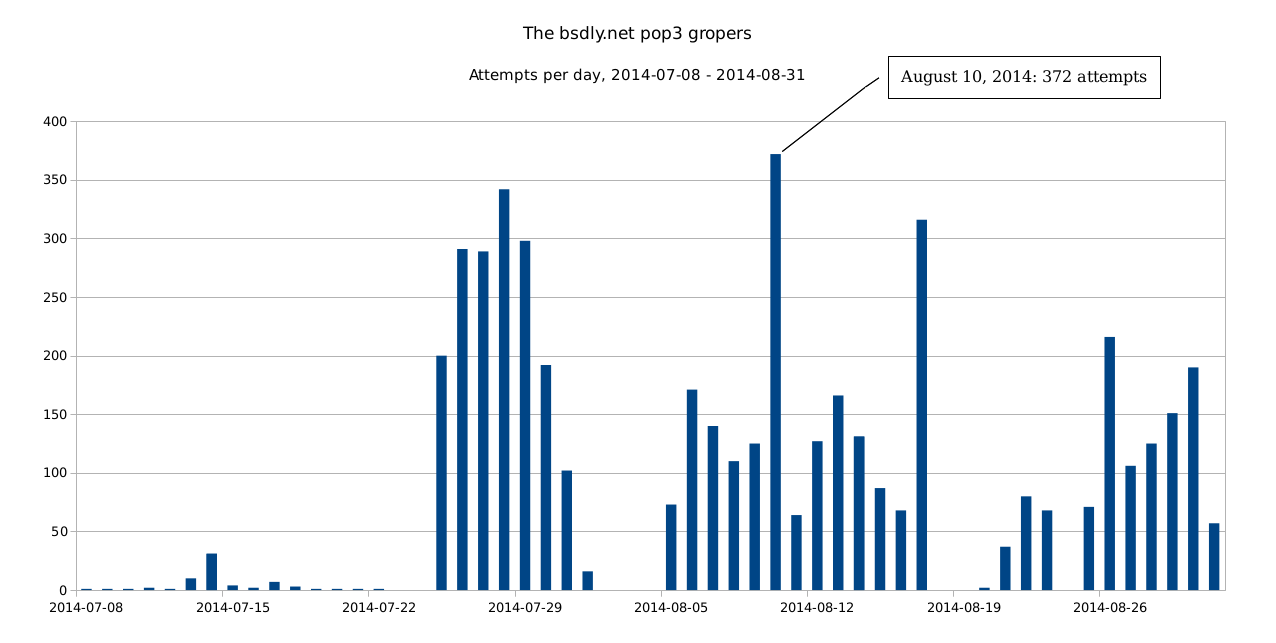
A graph of attempts per day, based on this .csv file and massaged via LibreOffice in this spreadsheet:


(larger .png here). I also tried feeding LibreOffice this .csv file with per hour data, but getting the data graphed in any sensible manner seems to require more effort than I'm inclined to put into that particular task.

Hosts participating with first and last seen dates: Possibly more useful is this .csv file, which has participating hosts in the same order as the List of compromised hosts participating but expanded to comprise the fields Attempts,Host,User Names,First Seen,Last Seen, where the last two are dates in formats that your spreadsheet should be able to parse and use as a sort key with only minor efforts. The host with the most attempts as of the last dump was only first seen on August 29th, while several of the top 10 have been with us since some time in July. And of course, at the other end of the scale, quite a few have made only one attempt to date. I'll be updating the data at semi-random intervals, likely at least once a day. Raw data and generated files can be found here, along with scripts used and even a few temporary files. The data can be used for any purpose as long as proper attribution is included. See the Hail Mary Cloud Data page for details, and the Hail Mary Cloud overview article for background information.

Update 2014-09-04: A separate effort detected Perceptive readers will have noticed that the data now includes traces of activity from hosts in the dynamic.adsl.gvt.net.br domain starting on September 2, 2014, which deviates far enough from the general distributed pattern that it's likely it represents a separate, if not overly successful, effort.

These four (so far) hosts have tried relatively long sequences of attempts at single user names at a time, targeting what I assume are 'probable' user names for that part of the world, 22 user IDs so far.  None of those user IDs expand to valid addresses in our domains, and just because I can, I've now added these user IDs to the spamtraps page as presumed members of our nxdomain.no domain. If you feel those hosts should be removed from the data for purposes of your own analyses, it's fairly easy to strip them away. In fact, a simple

$ grep -v dynamic.adsl.gvt.net.br filename

where filename is  either the raw authentication log or the extracted files that include hostnames will remove them from sight.

Update 2014-12-10: Data from this incident as well as some others have been included in my Passwords14 presentation, PDF version available too, here.

Update 2015-08-24: Since this article was originally posted, there have been several shorter episodes of pop3 groping activity, but mostly very low volume and short lived enough to be not really worth noting. However, at the very end of July 2015, the intensity increased sligtly, and I've preserved the log entries starting July 27 in a convenient place -  raw log data, overview .csv file, user names by frequency and finally hosts by frequency.

A very preliminary analysis of the data says we have a total of 268 hosts attempting access at least once, and apparent coordination (several hosts processing the same user name for a short while before moving on to the next) in several long sequences. We also see long sequences of one single host attempting one user name or an assortment of user names, and while we have a number of 'likely' user names (including my first name) as attempted user IDs, we also see an assortment of user IDs apparently lifted from the spamtraps page.

If you're seeing something like this in your logs, I'm interested in hearing from you. And if you're responsible for one or more of the systems that appear in those logs, you have a bit of cleaning up to do.


Book of PF News: All ten chapters and the two appendixes have been through layout and proofing, front and back matter is still a work in progress, expected arrival for physical copies is still not set. Those most eager to read the thing could try early access or preorder (a fourth edition is now available).

It's almost certain that physical copies will not be available at EuroBSDCon in Sofia, but If you make it to one of my sessions there, a special discount code worth 40% off on both the ebook and print version will be disclosed to attendees. (And I'm told it's active already, so if you guess what it is, you can use it.)

(And of course, as this blog post shows, the book came out and was well received, at least in some quarters.)

Update 2018-05-10: It appears that my spamtraps have entered a canon of sorts. On our freshly configured imapd, this happened. A few dozen login attemps to spamtrap IDs, earning of course only a place in the permanent blocks along with the popflooders as described in this article.

Saturday, October 5, 2013

The Hail Mary Cloud And The Lessons Learned

Against ridiculous odds and even after gaining some media focus, the botnet dubbed The Hail Mary Cloud apparently succeeded in staying under the radar and kept compromising Linux machines for several years. This article, based on my BSDCan 2013 talk, sums up known facts about the botnet and suggests some common-sense measures to be taken going forward.

The Hail Mary Cloud was a widely distributed, low intensity password guessing botnet that targeted Secure Shell (ssh) servers on the public Internet.

Note: This piece is also available without trackers but more basic formatting here.

The first activity may have been as early as 2007, but our first recorded data start in late 2008. Links to full data and extracts are included in this article.

We present the basic behavior and algorithms, and point to possible policies for staying safe(r) from similar present or future attacks.

But first, a few words about the devil we knew before the incidents that form the core of the narrative.

The Traditional SSH Bruteforce Attack

If you run an Internet-facing SSH service, you have seen something like this in your logs:

Sep 26 03:12:34 skapet sshd[25771]: Failed password for root from 200.72.41.31 port 40992 ssh2
Sep 26 03:12:34 skapet sshd[5279]: Failed password for root from 200.72.41.31 port 40992 ssh2
Sep 26 03:12:35 skapet sshd[5279]: Received disconnect from 200.72.41.31: 11: Bye Bye
Sep 26 03:12:44 skapet sshd[29635]: Invalid user admin from 200.72.41.31
Sep 26 03:12:44 skapet sshd[24703]: input_userauth_request: invalid user admin
Sep 26 03:12:44 skapet sshd[24703]: Failed password for invalid user admin from 200.72.41.31 port 41484 ssh2
Sep 26 03:12:44 skapet sshd[29635]: Failed password for invalid user admin from 200.72.41.31 port 41484 ssh2
Sep 26 03:12:45 skapet sshd[24703]: Connection closed by 200.72.41.31
Sep 26 03:13:10 skapet sshd[11459]: Failed password for root from 200.72.41.31 port 43344 ssh2


This is the classic, rapid-fire type of bruteforce attack, with rapid-fire login attempts from one source. (And yes, skapet is the Internet-facing host on my home network.)

The Likely Business Plan

These attempts are often preceded by a port scan, but in other cases it appears that the miscreants are just blasting away at random. In my experience, with the gateway usually at the lowest-numbered address, the activity usually turns up first there, before trying higher-numbered hosts. I'm not really in a mind to offer help or advice to the people running those scripts, but it might be possible to scan the internet from 255.255.255.255 downwards next time. Anyway, looking at the log excerpts, miscreants' likely plan is

  1. Try for likely user names, hope for guessable password, keep guessing until successful.
  2. PROFIT!
But then the attempts usually come in faster than most of us can type, so with a little help from toolmakers, we came up with an inexpensive first line of defense, easily implemented in perimeter packet filters (aka firewalls).

Traditional Anti-Bruteforce Rules

Rapid-fire bruteforce attacks are easy to head off. I tend to use OpenBSD on internet facing hosts, so first we present the technique as it has been available in OpenBSD since version 3.5 (released in 2005), where state tracking options are used to set limits we later act on:

In your /etc/pf.conf, you add a table to store addresses, block access for all traffic coming from members of that table, and finally amend your typical pass rule with some state tracking options. The result looks something like this:

table <bruteforce> persist
block quick from <bruteforce>
pass inet proto tcp to $int_if:network port $tcp_services \
        keep state (max-src-conn 100, max-src-conn-rate 15/5, \
         overload <bruteforce> flush global)

Here, max-src-conn is the maximum number of concurrent connections allowed from one host

max-src-conn-rate is the maximum allowed rate of new connections, here 15 connections per 5 seconds.

overload <bruteforce> means that any hosts that exceed either of these limits are have their adress added to this table

and, just for good measure, flush global means that for any host that is added to our overload table, we kill all existing connections too.

Basically, problem solved - the noise from rapid-fire bruteforcers generally disappears instantly or after a very few attempts. If you are about to implement something like this (and many do -- the bruteforcer section in my PF tutorial appears to be among the more popular ones), you probably need to watch your logs to find useful numbers for your site, and tweak rules accordingly. I have yet to meet an admin who plausibly claims to never have been tripped up by their overload rules at some point. That's when you learn to appreciate having an alternative way in to your systems, such as a separate admin network.

Traditional Anti-Bruteforce Rules, Linux Style

For those not yet converted to the fine OpenBSD toolset (available in FreeBSD and other BSDs too, with only minor if any variations in details for this particular context), the Linux equivalent would be something like

sudo iptables -A INPUT -i eth0 -p tcp --dport 22 -m state --state NEW -m recent --set --name SSH
sudo iptables -A INPUT -i eth0 -p tcp --dport 22 -m state --state NEW -m recent --update --seconds 5 \ --hitcount 15 --rttl --name SSH -j DROP

But be warned: this will still be minus the maximum number of connections limit, plus the usual iptables warts. And you'd need a separate set of commands for ip6tables.

It's likely something similar is doable with other tools and products too, including possibly some proprietary ones. I've made something of an effort to limit my exposure to the non-free tools, so I can't offer you any more detail. To find out what your present product can do, please dive into the documentation for whichever product you are using. Or come back for some further OpenBSD goodness.

But as you can see, for all practical purposes the rapid-fire bruteforce or floods problem has been solved with trivial configuration tweaks.

But then something happened.

What's That? Something New!

On November 19th, 2008 (or shortly thereafter), I noticed this in my authentication logs:

Nov 19 15:04:22 rosalita sshd[40232]: error: PAM: authentication error for illegal user alias from s514.nxs.nl
Nov 19 15:07:32 rosalita sshd[40239]: error: PAM: authentication error for illegal user alias from c90678d3.static.spo.virtua.com.br
Nov 19 15:10:20 rosalita sshd[40247]: error: PAM: authentication error for illegal user alias from 207-47-162-126.prna.static.sasknet.sk.ca
Nov 19 15:13:46 rosalita sshd[40268]: error: PAM: authentication error for illegal user alias from 125-236-218-109.adsl.xtra.co.nz
Nov 19 15:16:29 rosalita sshd[40275]: error: PAM: authentication error for illegal user alias from 200.93.147.114
Nov 19 15:19:12 rosalita sshd[40279]: error: PAM: authentication error for illegal user alias from 62.225.15.82
Nov 19 15:22:29 rosalita sshd[40298]: error: PAM: authentication error for illegal user alias from 121.33.199.39
Nov 19 15:25:14 rosalita sshd[40305]: error: PAM: authentication error for illegal user alias from 130.red-80-37-213.staticip.rima-tde.net
Nov 19 15:28:23 rosalita sshd[40309]: error: PAM: authentication error for illegal user alias from 70-46-140-187.orl.fdn.com
Nov 19 15:31:17 rosalita sshd[40316]: error: PAM: authentication error for illegal user alias from gate-dialog-simet.jgora.dialog.net.pl
Nov 19 15:34:18 rosalita sshd[40334]: error: PAM: authentication error for illegal user alias from 80.51.31.84
Nov 19 15:37:23 rosalita sshd[40342]: error: PAM: authentication error for illegal user alias from 82.207.104.34
Nov 19 15:40:20 rosalita sshd[40350]: error: PAM: authentication error for illegal user alias from 70-46-140-187.orl.fdn.com
Nov 19 15:43:39 rosalita sshd[40354]: error: PAM: authentication error for illegal user alias from 200.20.187.222
Nov 19 15:46:41 rosalita sshd[40374]: error: PAM: authentication error for illegal user amanda from 58.196.4.2
Nov 19 15:49:31 rosalita sshd[40378]: error: PAM: authentication error for illegal user amanda from host116-164.dissent.birch.net
Nov 19 15:55:47 rosalita sshd[40408]: error: PAM: authentication error for illegal user amanda from robert71.lnk.telstra.net
Nov 19 15:59:08 rosalita sshd[40412]: error: PAM: authentication error for illegal user amanda from static-71-166-159-177.washdc.east.verizon.net

... and so on. The alphabetic progression of user names went on and on.

The pattern seemed to be that several hosts, in widely different networks, try to access our system as the same user, up to minutes apart. When any one host comes back it's more likely than not several user names later. The full sequence (it stopped December 30th), is available here.

Take a few minutes to browse the log data if you like. It's worth noting that rosalita was a server that had a limited set of functions for a limited set of users, and basically no other users than myself ever logged in there via SSH, even if they for various reason had the option open to them. So in contrast to busier sites where sequences like this might have drowned in the noise, here it really stood out. And I suppose after looking at the data, you can understand my initial reaction.

The Initial Reaction

My initial reaction was pure disbelief.

For the first few days I tried tweaking PF rules, playing with the attempts/second values and scratching my head, going, "How do I make this match?"

I spent way too much time on that, and the short version of the answer to that question is, you can't. With the simple and in fact quite elegant state tracking options, you will soon hit limits (especially time limits) that interfere with normal use, and you end up blocking legitimate traffic.

So I gave up on prevention (which really only would have rid me of a bit of noise in my authentication logs), and I started analyzing the data instead, trying to eyeball patterns that would explain what I was seeing. After a while it dawned on me that this could very well be a coordinated effort, using a widely distributed set of compromised hosts.

So there was a bit of reason in there after all. Maybe even a business plan or model. Next, I started analyzing my data, and came up with -

Bruteforcer Business Plan, Distributed Version

The Executive Summary would run something like this: Have more hosts take turns, round robin-ish, at long enough intervals to stay under the radar, guessing for weak passwords.

The plan is much like before, but now we have more host on the attacking side, so
  1. Pick a host from our pool, assign a user name and password (picked from a list, dictionary or pool)
  2. For each host,
    1. Try logging in to the chosen target with the assigned user name and password
    2. If successful, report back to base (we theorize); else wait for instructions (again we speculate)
  3. Go to 1).
  4. For each success at 2.2), PROFIT!

You're The Target

Let's recap, and take step back. What have we learned?

To my mind at least, it all boils down to the basics
  • Your Unix computer (Linux, OpenBSD, FreeBSD or other) is a desirable, powerful thing.
  • If your password is weak, you will be 0WN3D, sooner rather than later.
  • There's a whole fleet out there, and they're coordinated.
At this point I thought I had something useful, so I started my first writeup for publication. I had just started a new job at the time, and I think I mentioned the oddities to some of my new colleagues (that company is unfortunately defunct, but the original linked articles give some information). Anyway, I wrote and published, hoping to generate a little public attention for myself and my employer. And who knows, maybe even move a few more copies of that book I'd written the year before.


Initial Public Reaction

On December 2, 2008, I published the first blog post in what would become a longish sequence, A low intensity, distributed bruteforce attempt, where I summarized my findings. It's slightly more wordy than this piece, but if I've piqued your interest so far, please go ahead and read. And as to a little public attention, I got my wish. The post ended up slashdotted, the first among my colleagues to end up with their name on the front page of Slashdot.

That brought
  • more disbelief, (see slashdot and other comments) but also
  • confirmation, via comments and email, that others were seeing the same thing, and that the first occurrences may have been seen up to a year earlier (November-ish 2007).

The slow bruteforcers were not getting in, so I just went on collecting data. I estimated they'd be going on well past new year's if they were going to reach the end of the alphabet.


On December 30th, 2008, The Attempts Stopped

The attempts came to an end, conveniently while I was away on vacation. The last entries were:

Dec 30 11:03:08 rosalita sshd[51108]: error: PAM: authentication error for illegal user sophia from 201.161.28.9
Dec 30 11:05:08 filehut sshd[54932]: error: PAM: authentication error for illegal user sophia from 201.161.28.9
Dec 30 11:06:35 rosalita sshd[51116]: error: PAM: authentication error for illegal user sophia from static-98-119-110-139.lsanca.dsl-w.verizon.net
Dec 30 11:09:03 filehut sshd[54981]: error: PAM: authentication error for illegal user sophia from static-98-119-110-139.lsanca.dsl-w.verizon.net


That is, not even completing a full alphabetic cycle.

By then they had made 29916 attempts, all failed. You can find the full listing at here).

Trying 6100 user IDs (list by frequency here). More than likely you can guess the top one without even looking.

From a total of 1193 different hosts (list by frequency here).

As I said earlier, there were no successful penetrations. Zero.


Common characteristics

The slashdot story brought comments and feedback, with some observations from other sites. Not a lot of data, but enough that the patterns we had observed were confirmed. The attempts were all password authentication attempts, no other authentication methods attempted.

For the most part the extended incident consisted of attempts on an alphabetic sequence of 'likely' user names, but all sites also saw at least one long run of root only attempts. This pattern was to repeat itself, and also show up in data from other sources.

There would be anything from seconds to minutes between attempts, but attempts from any single host would come at much longer intervals.

First Round Observations, Early Conclusions

Summing up what we had so far, here are a few observations and attempts at early conclusions.

At the site where I had registered the distributed attempts, the Internet-reachable machines all ran either OpenBSD or FreeBSD. Only two FreeBSD boxes were contacted.

The attackers were hungry for root, so having PermitRootLogin no in our sshd config anywhere Internet facing proved to be a good idea.

We hadn't forced our users to keys only, but a bit of luck and John the Ripper (/usr/ports/security/john) saved our behinds.

The number of attempts per user name had decreased over time (as illustrated by this graph), so we speculated in the second article Into a new year, slowly pounding the gates (on slashdot as The Slow Bruteforce Botnet(s) May Be Learning) that success or not was measured at a command and control site, with resources allocated accordingly.

With the sequence not completed, we thought they'd given up. After all, the odds against succeeding seemed monumental.

After all, a couple of slashdotted blog posts couldn't have hurt, could they?


But Of Course They Came Back

As luck would have it, whoever was out there had not totally admitted defeat just yet. In the early hours CET, April 7th, 2009, the slow brutes showed up again:

Apr 7 05:02:07 rosalita sshd[4739]: error: PAM: authentication error for root from ruth.globalcon.net
Apr 7 05:02:15 rosalita sshd[4742]: error: PAM: authentication error for root from ip-206-83-192-201.sterlingnetwork.net
Apr 7 05:02:54 rosalita sshd[4746]: error: PAM: authentication error for root from cyscorpions.com
Apr 7 05:02:59 rosalita sshd[4745]: error: PAM: authentication error for root from smtp.bancomorada.com.br
Apr 7 05:03:10 rosalita sshd[4751]: error: PAM: authentication error for root from 82.192.86.217
Apr 7 05:03:25 rosalita sshd[4754]: error: PAM: authentication error for root from 66.135.60.203
Apr 7 05:03:52 rosalita sshd[4757]: error: PAM: authentication error for root from rainha.florianonet.com.br
Apr 7 05:04:00 rosalita sshd[4760]: error: PAM: authentication error for root from 72.11.144.34
Apr 7 05:04:34 rosalita sshd[4763]: error: PAM: authentication error for root from s1.serverhex.com
Apr 7 05:04:38 rosalita sshd[4765]: error: PAM: authentication error for root from mail.pitnet.com.br


Starting with 2318 attempts at root before moving on to admin and proceeding with the alphabetic sequence. The incident played out pretty much like the previous one, only this time I was sure I had managed to capture all relevant data before my logs were rotated out of existence.

The data is available in the following forms: Full log here, one line per attempt here, users by frequency here, hosts by frequency here.

I couldn't resist kicking up some more publicity, and indeed we got another slashdot storm out of the article The slow brute zombies are back, on slashdot as The Low Intensity Brute-Force Zombies Are Back.

And shortly afterwards, we learned something new -

Introducing dt_ssh5, Linux /tmp Resident

Of course there was a piece of malware involved.

A Linux binary called dt_ssh5 did the grunt work.

The dt_ssh5 file was found installed in /tmp on affected systems. The reason our perpetrators chose to target that directory is likely because the /tmp directory tends to be world readable and world writeable.

Again, this points us to the three basic lessons:


  • Stay away from guessable passwords
  • Watch for weird files (stuff you didn't put there yourself) anywhere in your file system, even in /tmp.
  • Internalize the fact that PermitRootLogin yes is a bad idea.

  • dt_ssh5: Basic Algorithm

    The discovery of dt_ssh5 made for a more complete picture. A rough algorithm suggested itself:


    1. Pick a new host from our pool, assign a user name and password
    2. For each host,
      1. Try user name and password
      2. if successful
        1. drop the dt_ssh5 binary in /tmp; start it
        2. report back to base
        else wait for instructions
    3. Go to 1.
    4. For each success at 2.2, PROFIT!

    I never got myself a copy, so the actual mechanism for communicating back to base remains unclear.


    The Waves We Saw, 2008 - 2012

    We saw eight sequences (complete list of articles in the References section at the end),

    From - To AttemptsUser IDsHostsSuccessful Logins
    2008-11-19 15:04:22 - 2008-12-30 11:09:0329916610011930
    2009-04-07 03:56:25 - 2009-04-12 21:01:371264124911040
    2009-09-30 21:15:36 - 2009-10-15 13:42:079998110710
    2009-10-28 23:58:35 - 2010-01-22 09:56:2444513811041580
    2010-06-17 01:55:34 - 2010-08-11 13:23:0123014388755680
    2011-10-23 04:13:00 - 2011-10-29 05:40:0747739443380
    2011-11-03 20:56:18 - 2011-11-26 17:42:19490724742520
    2012-04-01 12:33:04 - 2012-04-06 14:52:1147571081230


    The 2009-09-30 sequence was notable for trying only root, the 2012-04-01 sequence for being the first to attempt access to OpenBSD hosts.

    We may have missed earlier sequences, early reports place the first similar attempts as far back as 2007.


    For A While, The Botnet Grew

    From our point of view, the swarm stayed away for a while and came back stronger, for a couple of iterations, possibly after tweaking their code in the meantime. Or rather, the gaps in our data represent times when it focused elsewhere.

    Clearly, not everybody was listening to online rants about guessable passwords.

    For a while, the distributed approach appeared to be working.

    It was (of course) during a growth period I coined the phrase "The Hail Mary Cloud".

    Instantly, a myriad of "Hail Mary" experts joined the insta-punditry on slashdot and elsewhere.

    It Went Away Or Dwindled

    Between August 2010 and October 2010, things either started going badly for The Hail Mary Cloud, or possibly they focused elsewhere.

    I went on collecting data.

    There wasn't much to write about, except possibly that the botnet's command and control was redistributing effort based on past success. Aiming at crackable hosts elsewhere.


    And Resurfaced In China?

    Our last sighting so far was in April 2012. The data is preserved here.

    This was the first time we saw Hail Mary Cloud style attempts at accessing OpenBSD systems.

    The majority of attempts were spaced at at least 10 seconds apart, and until I revisited the data recently, I thought only two hosts in China were involved.

    In fact, 23 hosts made a total of 4757 attempts at 1081 user IDs, netting 0 successful logins.

    The new frequency data I thought interesting enough to write about, so I wrote up If We Go One Attempt Every Ten Seconds, We're Under The Radar, and netted another slashdotting. I took another look at the data later and slightly amended the conclusions, the article has been corrected with proper data extracted.


    Then What To Do?

    The question anybody reading this far will be asking is, what should we do in order to avoid compromise by the password guessing swarms? To my mind, it all boils down to common sense systems administration:

    Mind your logs. You can read them yourself, or train a robot to. I use logsentry, other monitoring tools can be taught to look for anomalies (failed logins, etc)

    Keep your system up to date. If not OpenBSD, check openssh.com for the latest version, check what your system has and badger the maintainer if it's outdated.

    And of course, configure your applications such as sshd properly -

    sshd_config: 'PermitRootLogin no' and a few other items

    These two settings in your sshd_config will give you the most bang for the buck:

    PermitRootLogin no
    PasswordAuthentication no
    

    Make your users generate keys, add the *.pub to their ~/.ssh/authorized_keys files.

    For a bit of background, Michael W. Lucas: SSH Mastery (Tilted Windmill Press 2013) is a recent and very readable guide to configuring your SSH (server and clients) sensibly. It's compact and affordable too.


    Keep Them Out, Keep Them Guessing

    At this point, most geeks would wax lyrical about the relative strengths of different encryption schemes and algorithms.

    Being a simpler mind, I prefer a different metric for how good your scheme is, or effectivness of obfuscation (also see entropy):

    How many bytes does a would-be intruder have to get exactly right?
    I've summed up the answer to that question in this table:

    Authentication methodNumber of bytes
    PasswordPassword length (varies, how long is yours?)
    Alternate PortPort number (2 bytes, it's a 16 bit value, remember)
    Port KnockingNumber of ports in sequence * 2 (still a 16 bit value)
    Single Packet Authentication2 bytes (the port) plus Max 1440 (IPv4/Ethernet) or 1220 (IPv6/Ethernet)
    Key OnlyNumber of bytes in key (depending on key strength, up to several kB)


    You can of course combine several methods (with endless potential for annoying your users), or use two factor authentication (OpenSSH supports several schemes).


    Keys. You've Got To have Keys!

    By far the most effective measure is to go keys only for your ssh logins. In your sshd_config, add or uncomment

    PasswordAuthentication no
    

    Restart you sshd, and have all users generate keys, like this:

    $ ssh-keygen -C "userid@domain.tld"
    

    There are other options to play with, see ssh-keygen(1) for inspiration.

    Then add the *.pub to their ~/.ssh/authorized_keys files.

    And I'll let you in on a dirty little secret: you can even match on interface in your sshd config for things like these


    Why Not Use Port Knocking?

    Whenever I mention the Hail Mary Cloud online, two suggestions always turn up: The iptables example I mentioned earlier (or link to the relevant slide), and "Why not use port knocking?". Well, consider this:

    Port knocking usually means having all ports closed, but with a daemon reading your firewalls logs for a predetermined sequence of ports. Knock on the correct ports in sequence, your're in.

    Another dirty little secret: It's possible to implement port knocking with only the tools in an OpenBSD base system. No, I won't tell you how.

    Executive Summary: Don't let this keep you from keeping your system up to date.

    To my mind port knocking gives you:
    1. Added complexity or, one more thing that will go wrong. If the daemon dies, you've bricked your system.
    2. An additional password that's hard to change. There's nothing magical about TCP/UDP ports. It's a 16 bit number, and in our context, it's just another alphabet. The swarm will keep guessing. And it's likely the knock sequence (aka password) is the same for all users.
    3. You won't recognize an attack until it succeeds, if even then. Guessing attempts will be indistinguishable from random noise (try a raw tcpdump of any internet-facing interface to see the white noise you mostly block drop anyway), so you will have no early warning.
    Port knocking proponents seem to have sort of moved on to single packet authentication instead, but even those implementations still contain the old port knocking code intact.

    If you want a longer form or those arguments, my November 4, 2012 rant Why Not Use Port Knocking? was my take (with some inaccuracies, but you'll live).


    There's No Safety In High Ports Anymore

    Another favorite suggestion is to set your sshd to listen on some alternate port instead of the default port 22/TCP.

    People who did so have had a few years of quiet logs, but recent reports show that whoever is out there have the resources to scan alternate ports too.

    Once again, don't let running your sshd on an alternate port keep you from keeping your system up to date.

    Of course I've ranted about this too, in February 2013, There's No Protection In High Ports Anymore. If Indeed There Ever Was. (which earned me another slashdotting).

    Reports with logs trickle in from time to time of such activity at alternate ports, but of course on any site with a default deny packet filtering policy will not see any traces of such scans unless you go looking specifically at the mass of traffic that gets dropped at the perimeter.


    Final thoughts, for now

    Microsoftish instapundits were quick to assert that ssh is insecure.

    They're wrong. OpenSSH (which is what essentially everyone uses) is maintained as an integral part of the OpenBSD project, and as such is a very thoroughly audited mass of code. And it keeps improving with every release.

    I consider the Hail Mary Cloud an example of distributed, parallel problem solving, conceptually much like SETI@Home but with different logic and of course a more sinister intent.

    Computing power is cheap now, getting cheaper, and even more so when you can leverage other people's spare cycles.

    The huge swarm of attackers concept is as I understand it being re-used in the recent WordPress attacks. We should be prepared for swarm attacks on other applications as soon as they reach a critical mass of users.

    There may not be a bullseye on your back yet (have you looked lately?), but you are an attractive target.

    Fortunately, sane system administration practices will go a long way towards thwarting intrusion attempts, as in
    • keep your system up to date,
    • allow only what's necessary for the task at hand and
    • keep watching your logs for weirdness.
    Keep it simple, stay safe.

    UPDATE 2013-11-21: A recent ACM Conference on Computer and Communication Security paper, "Detecting stealthy, distributed SSH brute-forcing," penned by Mobin Javed and Vern Paxson, references a large subset of the data and offers some real analysis, including correlation with data from other sites (Spoiler alert: in some waves, almost total overlap of participating machines). One interesting point from the paper is that apparently attack matching our profile were seen at the Lawrence Berkeley National Laboratory as early as 2005.

    And in other news, it appears that GitHub has been subject to an attack that matches the characteristics we have described. A number of accounts with weak passwords were cracked. Investigations appears to be still ongoing. Fortunately, GitHub appear to have started offering other authentication methods.

    UPDATE 2014-09-28: Since early July 2014, we have been seeing similar activity aimed at our POP3 service, with usernames taken almost exclusively from our spamtrap list. The article Password Gropers Take the Spamtrap Bait has all the details and log data as well as references to the spamtrap list.

    UPDATE 2014-12-10: My Passwords14 presentation, Distributed, Stealthy Brute Force Password Guessing Attempts - Slicing and Dicing Data from Recent Incidents has some further data as well as further slicing and dicing of the earlier data (with slightly different results). 

    UPDATE 2016-08-10: The POP3 gropers never went away entirely and soon faded into a kind of background noise. In June of 2016, however, they appeared to have hired themselves out to a systematic hunt for Chinese user names. The article Chinese Hunting Chinese over POP3 in Fjord Country has further details, and as always, links to log data and related files.

    UPDATE 2020-04-28: Somewhat belatedly added a link to the more recent (August 2018) article Badness, Enumerated by Robots which has updates on data we currently collect with some further explanation. Also see links therein.

    Update 2025-07-19: If you found this piece to be useful, informative, annoying or would for some other reason like to contact me or comment, please do.

    Update 2026-02-23: If you have read this far, and have tried some of the configuration enhancements mentioned already, you might also enjoy setting up endlessh to take care of otherwise annoying would-be visitors.

    You might also be interested in reading selected pieces via That Grumpy BSD Guy: A Short Reading List (also here).


    References

    The slides for the talk this article is based on live at http://home.nuug.no/~peter/hailmary2013/, with a zipped version including all data at http://home.nuug.no/~peter/hailmary2013.zip (approx. 26MB) for your convenience.

    Mobin Javed and Vern Paxson, "Detecting stealthy, distributed SSH brute-forcing," ACM International Conference on Computer and Communication Security (CCS), November 2013.

    The blog posts (field notes) of the various incidents, data links within:

    Peter N. M. Hansteen, (2008-12-02) A low intensity, distributed bruteforce attempt (slashdotted)

    Peter N. M. Hansteen, (2008-12-06) A Small Update About The Slow Brutes

    Peter N. M. Hansteen, (2008-12-21) Into a new year, slowly pounding the gates (slashdotted)

    Peter N. M. Hansteen, (2009-01-22) The slow brutes, a final roundup

    Peter N. M. Hansteen, (2009-04-12) The slow brute zombies are back (slashdotted)

    Peter N. M. Hansteen, (2009-10-04) A Third Time, Uncharmed (slashdotted)

    Peter N. M. Hansteen, (2009-11-15) Rickrolled? Get Ready for the Hail Mary Cloud! (slashdotted)

    Peter N. M. Hansteen, (2011-10-23) You're Doing It Wrong, Or, The Return Of The Son Of The Hail Mary Cloud

    Peter N. M. Hansteen, (2011-10-29) You're Doing It Wrong, Returning Scoundrels

    Peter N. M. Hansteen, (2012-04-06) If We Go One Attempt Every Ten Seconds, We're Under The Radar (slashdotted)

    Peter N. M. Hansteen, (2012-04-11) Why Not Use Port Knocking?

    Peter N. M. Hansteen, (2013-02-16) There's No Protection In High Ports Anymore. If Indeed There Ever Was. (slashdotted)

    Peter N. M. Hansteen (2018-08-13) Badness, Enumerated by Robots (updates on data we currently collect, also see links therein).

    Other Useful Texts

    Marcus Ranum: The Six Dumbest Ideas in Computer Security, September 1, 2005

    Michael W. Lucas: SSH Mastery, Tilted Windmill Press 2013

    Michael W. Lucas: Absolute OpenBSD, 2nd edition No Starch Press 2013

    Peter N. M. Hansteen, The Book of PF, 4th edition, No Starch Press 2026, also the online PF tutorial it grew out of, several formats http://home.nuug.no/~peter/pf/, more extensive slides matching the most recent session at http://home.nuug.no/~peter/pf/newest/. More recently I've done a rewrite of the PF tutorial with Max Stucchi and Tom Smyth co-authoring and co-presenting, the lastest slides from one of these sessions are available at https://nxdomain.no/~peter/pf_fullday.pdf (sorry, labs available for real attendees only).

    OpenBSDs web http://www.openbsd.org/ -- lots of useful information.


    If you enjoyed this: Support OpenBSD!

    If you have enjoyed reading this, please buy OpenBSD CDs and other items, and/or donate!

    Useful links for this are:

    OpenBSD Donations Page: http://www.openbsd.org/donations.html.

    OpenBSD Hardware Wanted Page: http://www.openbsd.org/want.html.

    Remember: Free software takes real work and real money to develop and maintain.

    If you want to support me, buy the book!.
    The Hail Mary Cloud And The Lessons Learned is © 2013 -2026 Peter N. M. Hansteen
    You might also be interested in reading selected pieces via That Grumpy BSD Guy: A Short Reading List (also here).

    Saturday, February 16, 2013

    There's No Protection In High Ports Anymore. If Indeed There Ever Was.

    Running your service on a non-standard port buys you an equivalent of two more characters in your password. Will that save you any trouble at all?

    Looking back at the past week, the most interesting communication received here was not about meteorites hitting Russia (although some of the dashcam videos were really exciting), but rather about an old and very simple prediction of mine that appears to have come true.

    It came via an email message from a friend and somewhat infrequent correspondent, who wrote on February 15 2013,
    "[...] Here's something mildly curious, though. Between now and Dec 26, the current start of my authlog, the below tried to get in via port 2222 on my openbsd box. I'm surprised both that there are not many yet at the same time that there are any at all."
    And the log excerpt he sent me looked like this:

    Jan 11 16:02:01 net5501 sshd[3170]: Invalid user admin from 66.135.32.170
    Jan 11 17:58:43 net5501 sshd[2611]: Invalid user aadriano from 66.135.32.170
    Feb 10 17:16:33 net5501 sshd[23679]: Invalid user alex from 66.133.188.86
    Feb 10 17:18:32 net5501 sshd[20330]: Invalid user cactiuser from 66.133.188.86
    Feb 10 17:20:31 net5501 sshd[19432]: Invalid user www-data from 66.133.188.86
    Feb 10 17:24:28 net5501 sshd[29455]: Invalid user user from 66.133.188.86
    Feb 10 17:26:27 net5501 sshd[82]: Invalid user tomcat from 66.133.188.86
    Feb 10 17:28:26 net5501 sshd[31011]: Invalid user test from 66.133.188.86
    Feb 10 17:30:25 net5501 sshd[20057]: Invalid user temp from 66.133.188.86
    Feb 10 17:32:23 net5501 sshd[19848]: Invalid user service from 66.133.188.86
    Feb 10 17:34:22 net5501 sshd[31209]: Invalid user samba from 66.133.188.86
    Feb 10 17:38:20 net5501 sshd[12045]: Invalid user postgres from 66.133.188.86
    Feb 10 17:40:20 net5501 sshd[1085]: Invalid user oracle from 66.133.188.86
    Feb 10 17:42:19 net5501 sshd[12896]: Invalid user nagios from 66.133.188.86
    Feb 10 17:44:19 net5501 sshd[10681]: Invalid user mysql from 66.133.188.86
    Feb 10 17:46:19 net5501 sshd[27897]: Invalid user guest from 66.133.188.86
    Feb 10 17:48:19 net5501 sshd[13400]: Invalid user tom from 66.133.188.86
    Feb 10 17:50:18 net5501 sshd[5132]: Invalid user ftp from 66.133.188.86
    Feb 10 17:54:15 net5501 sshd[28789]: Invalid user jboss from 66.133.188.86
    Feb 10 17:56:14 net5501 sshd[20435]: Invalid user backup from 66.133.188.86


    So just a sampling of likely service user IDs on a random system, right?

    The reason why this is significant is that my friend, like a few others, tired of the apparently never ending password guessing attempts that were hitting the sshd (also known as the Secure Shell Daemon) listening on the standard port 22, and moved the service to listen on a different port instead.

    The immediate effect in almost all cases was a much quieter authentication log, because the password guessers weren't yet trying to bother you on non-standard ports.

    Those of us who could for one reason or other not be bothered to change the config to have our sshds run on other ports and using OpenBSD on anything Internet-facing soon found ourselves using the state-tracking features of OpenBSD (introduced in the May 2005 3.7 release). I wrote about it in the PF tutorial, specifically the Turning away the brutes part, and of course a slightly embellished version made it into The Book of PF. Please note the sentence somewhere down the page,
    "You might consider moving the service to some other port, but then again, the ones flooding you on port 22 would probably be able to scan their way to port 22222 for a repeat performance."
    The news is that this is now happening. The only surprise here to my mind is that signs of that exact activity has not been reported earlier. I put that down to mainly two factors. One is that the number of sites running their ssh service only on non-standard ports is probably quite small, another is that people who run services in general pay way too little attention to their logs.

    To those of us who run our packet filtering with a default deny policy and drop anything that's not relevant to services we actually run, those attempts to access ports where we do not run anything are simply part of the background noise, so we drop and ignore unless we're looking for patterns in the connection attempts we drop. So we wouldn't necessarily notice the attempts either.

    And for all I know (I really can't resist a dig at the high port refugees) it could be that for the most part, those who have moved their main login service to a non-standard port pay less attention to their logs than the rest of us, now that they have obscured the entrance to the kingdom to their own satisfaction if not so many else's.

    As I've argued elsewhere, obscuring your login service via non-standard ports or even a requirement to try several ports in sequence really only buys you security equivalent to lengthening your password by two characters per port. After all, TCP and UDP port numbers are limited to 65536 distinct values, within the scope of a 16-bit value. Moving your service to a non-standard port means that the would-be intruder has to guess a two-byte value. Introducing a sequence of ports buys you the added obscurity of two bytes per port.

    I have reason to believe that my correspondent here has done away with passwords altogether for logins to his systems, and therein lies the real solution: SSH offers out of the box the opportunity to allow only key based authentication, and with a little extra effort, you can implement more sophisticated authentication schemes. One useful reference for ssh in addition to the manual pages (starting with this one, all of the expected OpenBSD quality) is Michael Lucas' recent book SSH Mastery.

    Stay safe, please move from passwords to passphrases, and apply those to your keys only, never to be transmitted in the clear over the net where you never know who could be listening in.

    For anyone else seeing this kind of activity, as always I'll be very happy to hear from you, via comments or email.

    Good luck and good night.

    Thanks to Lars Noodén for valuable input for this column.


    Note: A Better Data Source Is Available
    Update 2013-06-09: For a faster and more convenient way to download the data referenced here, please see my BSDCan 2013 presentation The Hail Mary Cloud And The Lessons Learned which summarizes this series of articles and provides links to all the data. The links in the presentation point to a copy stored at NUUG's server, which connects to the world through a significantly fatter pipe than BSDly.net has.

    Wednesday, April 11, 2012

    Why Not Use Port Knocking?

    The robots currently at work knocking around for your guessable password could easily be repurposed to guess your Unicode password currently known as your port knocking sequence, and quite likely have been already. Plus, we already have authpf(8) for network-level restrictions on access.

    Whenever you write about security in general and SSH security in particular (and for good measure also get slashdotted for your efforts), the comments inevitably turn up a variety of useful and less useful suggestions.

    Note: This piece is also available without trackers but classic formatting only here.

    The April 6th, 2012 article about the possible preparations for a new round of slow bruteforcers was no different. Some of these recurring ideas are worthy of some more attention, and a more or less complete list is as follows -

    • Set up iptables with the recent module - a clear indication that the commenter did not, in fact read the article. That module implements a subset of the state tracking techniques from my PF rule set referenced in the article, but unlike the PF rules it is specific to the SSH protocol rather than a general technique. And inevitably, the actual configuration the poster presents would in fact not trigger on the kind of traffic we see from the Hail Mary Cloud with its signature slow brute force attempts. Misunderstandings of this kind keep cropping up, for no good reason.

    • Disable root logins over the network. Yes, this is obviously useful, and if I remember correctly, PermitRootLogin no is the default in recent OpenSSH versions. Do remember to check what the setting is on your kit, obviously.
       
    • Use packet filtering or other means to restrict where users can log in from. Once again, a very useful suggestion, but some sites may require shell access from semi-random locations, so practical issues (aka real life) can interfere with this one.

    • Disable password logins entirely, and allow only key-based logins. Another a very useful suggestion, and one that is useful for several reasons. You do get the downside of managing your keys securely, but key-only logins are generally recommended practice and should be encouraged.

    • Set up your sshd to listen on a non-standard port. Several sites report less log file noise after moving their sshd to a non-standard port. Easy to implement and possibly useful, but if a prospective attacker takes the time to do a real port scan for active services, they will find your sshd running on port 22222 fairly easily. I'd say moving your sshd to listen on a non-standard port postpones rather than solves the problem.

    • Use denyhosts to automatically add hosts with too many failed logins to a blacklist. Yes, an excellent idea in principle, but it comes with one caveat: Creating a blacklist automatically leaves you in charge of maintaining its content. Blacklist maintenance -- as in keeping your lists up to date and useful, is a complex enough issue that I'm fairly confident it is worth a separate column, and I most likely will return to the issue later. (Update: I did return to the subject, in a 2013 column called Maintaining A Publicly Available Blacklist - Mechanisms And Principles)

    • Why not set up port knocking? Well, as you may have guessed I'm about to tell you about a few whys not. I've been circling port knocking as an article subject for a long time, and now it seems that the time has come to outline why I think that port knocking emphatically not a good idea. Read below for my take on the subject.
    Port Knocking: Threat Or Menace?
    I must admit that the port knocking concept fascinated me at first, but all implementations had the downside of adding yet another piece of clearly experimental software to my system along with somewhat convoluted procedures for setting the thing up, so I left it for later.

    At each of the later dates when i decided to look into the topic again, I discovered new reasons not to like the method (read this thread on OpenBSD-misc for a particularly disenchanting example -- how's single-packet unconditional remote reboot or remote kill your sshd for a feature?). Finally, it was the appearance of the slow bruteforcers (also known as the Hail Mary Cloud) that made me finally decide that port knocking is neither particularly elegant or actually useful.

    One of the reasons the port knocking concept seems so deceptively attractive is probably that it is fairly easy to explain (see the Port Knocking article on Wikipedia for a fairly thorough treatment). The target system runs with no services accessible to the outside, and in order to gain access a remote system must send a specific, pre-determined sequence of packets aimed at specified ports. Unless you know (or are able to guess) the correct sequence of ports, you will not be able to gain any access to the target system.

    And after this explanation, the naive listener goes
    "Oh, how clever, we send packets to random ports!
    Nobody will ever be able to guess our combination!".

    But first impressions are not always correct. First, please take one step back and explain to me what problem this is supposed to solve. If the answer is the old canard "all the insecurities of that horrible SSH protocol", I will ask you to please point out to me just what those are, and if you will, describe which parts of what I am about to describe actually adds value (that's "security" to you) in a real life scenario.

    So let's go straight to the the core of the matter, and consider what actual information content an attacker would need to get right in order to gain access to the system. The hopeful would need to know or guess a sequence of TCP or UDP ports. In both cases, the range of possible ports is a 16 bit number, with a total of 65536 possible values.

     Each value is a 16-bit number, with a size of two bytes, or equal to two ASCII characters or one Unicode character. Port knocking examples generally do not run to more than three packets, which means that the minimum amount of information a prospective attacker would need to get right in order to gain access is six bytes, equal to six ASCII characters or three Unicode characters.

    Seen from this angle, all port knocking gets you is a somewhat cumbersome method for encoding your unicode password. In most implementations, that password would even be common to all users, with no easy way to change it.

    And of course, in almost all other contexts where passwords are used, most sites dictate that you choose a personal password that is longer than six bytes. So that's at least two failures rolled into one: a password that's common to several or all users, and one that is hard or impossible to change, possibly even short enough to fail even basic guidelines.

    The amount of information an attacker would need to get right, measured in number of bits or bytes is a fairly useful measure. I admit it's a fairly crude measure, but at least real data are easy to obtain, and since we are talking here about designing and maintaining systems, not writing them, how much cryptographic fun goes into generating the necessary data is not really relevant to the context. Proper cryptography is essential to maintain confidentiality and ensure the integrity of the communications, but we'll leave the details of the crypto bits for a later time.

    One other factor that speaks against most implementations of port knocking is that the system runs with no ports open, and a daemon that parses firewall logs for anticipated sequences of port numbers contacted as the sole authority to determine whether access will be granted. We all know that all non-trivial software will contain bugs, so what are the chances that even a fairly simple deamon will at some point in the future be confronted with a situation that makes it terminate, making your system inaccessible (or as we say around here, "bricking your system")?

    And one other thing, how do you spot an attacker? If you're looking for access attempts to closed ports, as you should be if you run a port knocking setup, how do you spot an attacker in the primal soup of noise that will anyway be arriving at your public interfaces? Do you, for example, record all sequences that could possibly be seen as unsuccessful attempts and put the source addresses in a "definitely banned" list?

    I have not seen any useful answer to that one either. Doing a sudo tcpdump -nettti pflog0 action drop (that is, using tcpdump(8) to extract information on blocked traffic from my packet filtering setup, directly from the log device) on my gateway here certainly shows me access attempts to ports I didn't know much about -- what legitimate purpose, for example, is UDP port 287 actually used for? Once again it all boils down to the fact that if you rely on port knocking, you're really only implementing a cumbersome variant encoding of relatively short passwords.

    On a side note (thanks to Adrian Close for reminding me), anybody who sits in the signal path between your knock target and somebody executing the correct knock sequence will be able to record the connections (using, for example, a netflow based tool -- expect to see Netflow-themed columns here in the future), making your closely guarded secret roughly equivalent to a plaintext password much like we used to see in old-style ftp setups.

    Next, let us let us instead look at the thing port knocking is trying to protect, namely the sshd service. Typical SSH connection setup involves the transfer of at least the public host keys (typically in the some hundred bytes to several kilobytes range), followed by the user authentication which can involve passwords, keys or a number of cryptography based toys^H^Hols, in any case producing further transfer and validation of anything up to several more kilobytes of data (and in some setups, use of out-of-band methods like short lived keys generated by special-purpose devices) before any meaningful access is possible. The exchange and validation of host keys in itself involves more information that the attacker would have to get right in order to gain access than is involved in any port knocking setup I've seen demonstrated. And remember, host keys exchange is only one early steps of several on the way to authentication.

    For the actual math on how data sizes and entropy is significant (yes, in some contexts, size does matter), see the Wikipedia entry and a somewhat shorter summary by Phil Ratcliffe.

    All port knocking implementations share the problems I've outlined, and their proponents have tended to ignore or gloss over the issues rather than address them. It is an unfortunate and perhaps embarrasing fact that port knocking in practice comes down to implementing and maintaining a separate set of passwords, and in all likelihood you will be using tools that are less appropriate for the task than the ones that already come with the base system on any reasonable Unix-like system.

    In an environment where we know there are large, distributed efforts underway to crack easily guessable passwords, it is naive not to assume that the same password guessing tools could be adapted to try sequences of TCP or UDP ports instead of character sequences. If there is in fact any significant number of systems that use port knocking today, it would surprise me if this isn't already happening. The way I see it, the belief that port knocking in fact offers an effective protection against attackers is a dangerous misunderstanding and probably only serves to divert your attention away from the real problems involved in keeping your systems running in a secure fashion.

    If you're still not convinced, I'll show you a better way

    Now, if you really, really want to implement port knocking anyway, I'll let you in on a dirty little secret: you don't need a write a new daemon or install anything besides what's already in the OpenBSD base system (or for that matter, on other PF-equipped BSD variants).

    You can implement port knocking in a relatively straightforward manner via minor contortions in your PF rule set, and I know for a fact that people have done just that. The examples I was thinking of before I started writing this piece appear to have been removed from the public eye, but with a little effort using the obvious keywords, some well intended but actually quite bad advice on how to put together a seemingly elegant implementation will be on its way to you.

    Be aware that you will be doing things the tools were not designed for, and more likely than not you will soon find yourself in a mess of rinky-dink workarounds that keep fighting back.

    If, however, what you really want to do is create a separate line of defence with its own round of authentication required for access, your OpenBSD base system already contains a suitable tool in authpf(8). It's fairly easy to come up with a setup that lets your users log in to the authenticating gateway, using any authentication method sshd(8) supports.

    You can even run your inital sshd(8) on a separate, non-standard port if you like, and a successful login at that point will only result in a set of packet filtering rules (possibly tailored to that specific user) being loaded. When the ssh session terminates, the rules are unloaded, and the system reverts to the state it had before the user authenticated.

    The tools are as flexible and robust as you have come to expect from the OpenBSD system tools (even if you're not running OpenBSD at the moment, you are by a large margin more likely than not using OpenSSH as your ssh client and server, which is supplied to the world by the OpenBSD project), and you can tailor your access profiles and services to your heart's content so they fit your needs.

    If you've read this far, you've probably also come to the conclusion that port knocking is really not the way to go. Other, more appropriate tools exist. But how to go about improving the situation?

    My suggestions follow below, with some specific suggestions that may have a personal slant.

    A Path To Self Improvement

    As with any problem that is really rooted in a lack of information or knowledge, educating yourself is the key. Read up on relevant subjects, go back and determine what problem you are actually trying to solve, and then perhaps shop around for tools that will help you solve that problem.

    My suggestion is to go to first to www.openbsd.org and browse the resources available there, including the online manual pages and the extensive FAQ document that actually serves quite well as a user manual.

    The next logical step is to go to the Orders page and order at least one copy of the latest release (and if you're reading this not too long after publication, do pre-order the upcoming release as well). If you're too impatient to wait for the postal services' mules to load up and deliver, you could download the release (or a -current snapshot if you're feeling adventurous) from a suitable mirror site and start installing right away.

    If you don't order any merchandise, you really should head over to the donations page and donate at least an amount equal to the cost of the CDs and other stuff you would otherwise have ordered. There are several fit and frightening ghosts primed and ready to come haunt you if you don't.

    If you want some literature to back up the official OpenBSD documentation, you could do worse than order The Book of PF, 4th edition and Michael W. Lucas' 2012 book SSH Mastery. Using those links here will ensure the OpenBSD project gets a larger-than-otherwise cut of the money as net profit. There are also electronic versions available for both titles (see The Book of PF home page or the SSH Mastery home page for details). If you're really short of funds, even the free, online PF tutorial that the Book of PF evolved from will get you started.

    And finally, there are few places better to collect useful information about OpenBSD and its sister operating systems than the various local and regional user groups and conferences such as the upcoming BSDCan in Ottawa, Canada May 9th through 12th, 2012 or EuroBSDCon, with this year's version to be held in Warsaw, Poland, October 18th through 21st.

    These events attract both regular users (some of them quite proficient) as well as a useful subset of the people who write and maintain the tools.
    Whatever you end up doing, buying or downloading, please keep in mind that it's your responsibility to keep your systems in the best possible shape, and make sure you monitor them properly, via log files or other means. Also see the Pledge of the Network Admin for my (slightly humorous) take on that responsibility. Along with the better parts of the tutorial, it made its way into the book, too.

    Thanks
    to Michael Dexter, Kristaps Dzonsons, Michael W. Lucas, Thordur Bjornsson and Henning Brauer for insightful comments and valuable input.

    Copyright © 2012 Peter N. M. Hansteen


    If you found this article inspiring, irritating, useful or otherwise moving, please let me know via the comments field just below here, or if you like, drop me a line at peter at bsdly dot eu.

    Note: A Better Data Source Is Available
    Update 2013-06-09: For a faster and more convenient way to download the data referenced here, please see my BSDCan 2013 presentation (also in article form as The Hail Mary Cloud And The Lessons Learned) which summarizes this series of articles and provides links to all the data. The links in the presentation and the article point to a copy stored at NUUG's server, which connects to the world through a significantly fatter pipe than BSDly.net has.