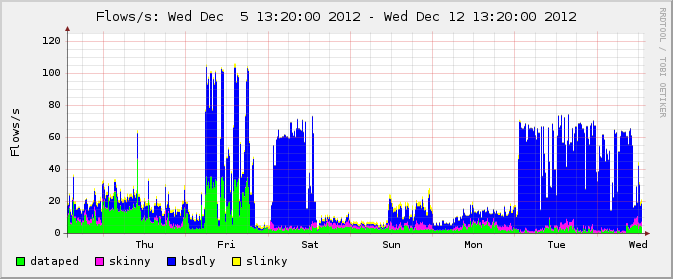
One question I get a lot (or variants that end up being very close) is, "How do you keep up with what's happening in your network?". A close cousin is "how much do you actually know about your users?".
The exact answer to both can have legal implications, so before I proceed to the tech content, I'll ask you to make sure you understand the legal framework you will be working under with respect to any regulatory requirements or other legal limits as they apply to monitoring in general and your users' privacy in particular before you proceed to setting up a monitoring infrastructure. Legalisms can be tiring to a techie, but illegality can bite you really really hard.
Now for the tech side of things, of course I have network monitoring and a few favorite tools. This article has been brewing, for some values of, for quite a while. While I was collecting notes and anecdotes, last (Northern hemisphere, 2013) summer yielded news stories that showed more pervasive surveillance than most had even imagined, operated by a three letter US government agency, and writing about the relatively benign techniques in my favorite toolbox became less appealing for a while.
But the questions about how to really get to know your network are still relevant to networking practitioners, so I'll let you in on a few not really secret facts about how it's done. Of course all of the things I describe here are easier if you're using OpenBSD, but then you probably knew that fact about our favorite operating system already.
OpenBSD has traditionally had an impressive suite of networking tools, and as we know every release brings new enhancements and sometimes brand new tools for us to make use of.
Enter pflow(4), Yet Another Network Pseudo Device
The NetFlow protocol was invented at Cisco in the early 1990s. It's designed to collect traffic metadata, where the basic unit of reference is the flow, defined as the source and destination IP address pair, the matching source and destination port for protocols that use them, the protocol identifier, time started and ended, number of packets sent, number of bytes sent, and a few other fields that have varied somewhat over the NetFlow versions.
Flows are unidirectional, and a TCP connection will typically consist of a pair of flows, one in each direction. For contexts where you do not need to store the content of the traffic, this is the data you want. A multi-gigabyte file transfer, once it concludes, will produce a netflow record that takes up only on the order of a few hundred bytes, much the same as the almost dataless name service request that probably preceded it.
On OpenBSD, various netflow sensors and collectors had been available for a while when the new network pseudo device pflow(4) debuted in OpenBSD 4.5. As you would expect on OpenBSD, pflow is tightly assosciated with PF, and collecting data from an OpenBSD machine (typically a gateway) involves adding the state option pflow to PF rules that you want to collect Netflow data for, much like you would pick rules for logging with log or log (all) options. To wit, a rule for collecting pflow data would look something like this:
pass out log inet proto tcp from <clients> to port $email keep state (pflow)
But then generating pflow data proved so enormously useful in a lot of contexts that the OpenBSD 4.5 release also included an option to set state-defaults that would apply to all rules in the rule set unless specifically excempted. You guessed it, the most popular set in a number of PF shops became
set state-defaults pflow
Once you have reloaded your rule set with the pflow option in place, you are generating pflow data (in this case, for any traffic that matches a pass rule in the rule set). But to actually get the data to somewhere you can study them, you need to set up both a sensor and collector. The sensor is the pflow interface, which you configure via ifconfig commands, or for a permanent configuration, in the /etc/hostname.pflow0 interface configuration file. The /etc/hostname.pflow0 on the gateway closest to me right now looks like this:
which means, essentially, that any pflow data generated will be sent with a source address of 213.187.179.198 to the collector we hope is listening at 192.168.103.252, UDP port 9995. Every flow is recorded, and sent to the collector. The flowproto 10 part means we use flow protocol version 10, the latest one with all the newest bells and whistles (which is recommended on OpenBSD only on version 5.5 or newer).
The Collector
Up to this point, you are free to choose any collector at all, or for that matter, let your pflow sensor send data endlessly into the void. In The Book of PF I spend quite a bit of time explaining netflow via Damien Miller's excellent flowd, mainly because it's damned fine software and very well suited for the purpose, but here I'll go the lazy route and show you the tool I actually use, which is nfsen, which comes out of the OpenBSD package system with a usable web interface as a front end to nfcapd and a host of related tools.
Do take some time to click that nfsen reference, the documentation there is quite usable and provides better illustrations than what I can offer at the moment.
Installing nfsen on OpenBSD is, as expected, as simple as can be. On an otherwise normally configured OpenBSD system, the single command
will get you most of the way there. Do read the package readme as the messages instruct you to. Basically, you will need edit the configuration file /etc/nfsen.conf. Adding data sources is likely the only thing you will need to do at first, look for the stanza that looks like this:
Here you add the sources you have configured earlier. I give all my sources a distinct color (picking among the CSS-style RGB values you youngsters probably know by heart but old farts like me always have to look up), IP address, type and port, so it's easier to tell them apart.
Then you run a perl script to configure the package, start httpd, start the nfsen package (and add it to the pkg_scripts= line in your /etc/rc.conf.local so it will start at next reboot too).
That's all there is to it. Soon the web interface will start filling in the graphs, and you can point and click your way around address ranges, time ranges and a host of other parameters. You will find that every connection you specified in your configuration is indeed logged, and you have all the metadata you asked for.
After a while you will start appreciating that nfsen displays the command line version of your point and click choices, so you have a better starting point for those wrinkles in the data that are not easily or at all accessible via the web interface.
The All-Seeing Eye Of The Evil Network Overlord
You can tell just who, or at least what IP addresses interacted with each other when, how much data was transferred and to of from what services or ports. It stands to reason that in most jurisdictions there are rules about how data of this kind is to be handled and secured. Make sure you deal properly with the data you collect, staying within whatever limits apply to you. But within those limits, here's your chance to be an evil network overlord. Use it wisely.
Netflow data has been used for a number of things. In his very readable book Network Flow Analysis, Michael W. Lucas relates a story about how they pinpointed the source of entry for a Windows worm into a corporate network using netflow data. I've found netflow to be very useful in a number of contexts myself (as briefly mentioned in the earlier DDOS article, and using netflow data to charge for metered access is not unheard of either), but the most striking example I've seen did not involve an attack, merely an intermittent network nuisance that occasionally cost insane amounts of money.
The setting was this: A couple of years ago, I was a relatively new hire in a large corporation that serves IT services of various kinds among others to an almost equally-sized financial firm. In one part of the financial firm there was a place where trades involving dollar values larger than most of us can imagine were made using a telnet interface to something else, and the 80 by 25 character displays were at times not moving at all. Trades were lost because the tiny packets did not arrive on time.
By the time I joined the company, the regular network crew that took care of that particular arm of the financial firm had been unsuccessfully trying to debug and fix the disruptions for quite a while. A call went out for help, and I proposed setting up a Netflow collector much like what I described earlier in the article.
The proposed budget was pretty close to nothing at all besides my time, so I got the go-ahead. The OpenBSD part of the configuration was done inside half an hour, and after peeking at Michael's book I even fished out the right sequence for the Cisco wranglers to input in their gear so useful data started arriving.
Then came the long wait. Graphs were accumulating, and after a while I would put several weeks' graphs on top of each other and hold them up to a light source. They matched perfectly. I could tell when people started arriving at work, I could tell when trading started in various cities, I could see the dip for lunch breaks, and the traffic peak for the nightly backups was easy to identfy.
But the source of the random network disruption did not turn up in the overall data volumes.
After a few weeks, I asked the local IT support to send me an email as soon as possible when disruptions occurred, with the name and/or IP address of the computers seeing disruption. Soon after, the first messages started arriving. I used the nfsen web interface to search the data around the reported times and looking at the IP ranges. At first, nothing really stood out. There was no sudden increase in data transferred at my sensors.
But then it occurred to me that the overall data volume was not necessarily the problem, so I started looking at hosts in the likely address range by number of flows (as in, number of open connections). That was all it took. Going back over a handful of reports, I noticed that on every occasion, for a few minutes one particular IP address stood out. For a very short time, a few days every week, one host on the network owned essentially all flows that passed by my sensors. No other host came even close.
It turned out that the machine was used to generate some rather heavy duty reports, collecting data from a large number of data sources. My guess is that the reporting software was one of those things that started small and grew over time, and after a few years it became a marked liability, simply because it was connected to the same switch that the traders were using, and reports were generated during trading hours.
I wrote up my report with graphs taken from nfsen (since destroyed and anyway not for public consumption, ever), and recommended that they find a way to move the report generator off to a separate location, perhaps even one with better connectivity to important data sources. I think they took that advice and acted upon it, but I suppose I'll never know for sure.
If you're interested in network traffic monitoring in general and NetFlow tools in particular, you could do worse than pick up a copy of Michael W. Lucas' recent book Network Flow Analysis. Michael chose to work with the flow-tools family of utilities for the book, but he does an outstanding job of explaining the subject in both theory and practical applications. What you read in Michael's book can easily be transferred to other toolsets once you get at grip on the matter.
I've focused mainly on OpenBSD here, but netflow sensors exist or should exist for essentially anything that has a TCP/IP stack. And nfsen works well on Linux and other Unix-like systems, too, I've heard tell.
As I write this I'm still working on the third edition of The Book of PF. The third edition came to be mainly because of changes introduced in OpenBSD 5.5, and the plan we're working towards is to have the book ready in time for the release. As you may have seen elsewhere, The Book of PF, 4th Edition is now available, with updates covering OpenBSD 7.8 and FreeBSD 14.n, with some forward looking material on OpenBSD 7.9 and FreeBSD 15 as well as previews of features that will be in FreeBSD 16 only.x
BSDCan: I will be at BSDCan again this year, offering two tutorials (see the Upcoming Talks panel at top right). More details will follow later, but these sessions will be designed mainly from input I receive from prospective attendees, and so will be critically dependent on your input, or even more so than earlier. See you there!
Update 2014-03-01: Thanks to Sebastian Benoit for pointing out that configuring pflow with flowproto 10 is really only well supported on OpenBSD 5.5 and newer.
Update 2014-04-27: PF tables vs html tags sometimes does not end well. Fortunately fixable.
Update 2015-10-25: For running nfsen with the OpenBSD httpd (and possibly others), you likely will be happier if you add php_fpm (which the nfsen package pulls in as a dependency) to the pkg_scripts variable in your /etc/rc.conf.local, much like this:
pkg_scripts="php_fpm nfsen"
Discovered the hard way, one could say, only after a power outage broke the serenity of my lab's nfsen installation, the web server only spitting out 500 internal server error messages.flowsrc 213.187.179.198 flowdst 192.168.103.252:9995 pflowproto 10
which means, essentially, that any pflow data generated will be sent with a source address of 213.187.179.198 to the collector we hope is listening at 192.168.103.252, UDP port 9995. Every flow is recorded, and sent to the collector. The flowproto 10 part means we use flow protocol version 10, the latest one with all the newest bells and whistles (which is recommended on OpenBSD only on version 5.5 or newer).
The Collector
Up to this point, you are free to choose any collector at all, or for that matter, let your pflow sensor send data endlessly into the void. In The Book of PF I spend quite a bit of time explaining netflow via Damien Miller's excellent flowd, mainly because it's damned fine software and very well suited for the purpose, but here I'll go the lazy route and show you the tool I actually use, which is nfsen, which comes out of the OpenBSD package system with a usable web interface as a front end to nfcapd and a host of related tools.
Do take some time to click that nfsen reference, the documentation there is quite usable and provides better illustrations than what I can offer at the moment.
Installing nfsen on OpenBSD is, as expected, as simple as can be. On an otherwise normally configured OpenBSD system, the single command
$ doas pkg_add nfsen
will get you most of the way there. Do read the package readme as the messages instruct you to. Basically, you will need edit the configuration file /etc/nfsen.conf. Adding data sources is likely the only thing you will need to do at first, look for the stanza that looks like this:
%sources = (
    'upstream1'    => { 'port' => '9995', 'col' => '#0000ff', 'type' => 'netflow' },
    'peer1'        => { 'port' => '9996', 'IP' => '172.16.17.18' },
    'peer2'        => { 'port' => '9996', 'IP' => '172.16.17.19' },
);
Here you add the sources you have configured earlier. I give all my sources a distinct color (picking among the CSS-style RGB values you youngsters probably know by heart but old farts like me always have to look up), IP address, type and port, so it's easier to tell them apart.
Then you run a perl script to configure the package, start httpd, start the nfsen package (and add it to the pkg_scripts= line in your /etc/rc.conf.local so it will start at next reboot too).
That's all there is to it. Soon the web interface will start filling in the graphs, and you can point and click your way around address ranges, time ranges and a host of other parameters. You will find that every connection you specified in your configuration is indeed logged, and you have all the metadata you asked for.
After a while you will start appreciating that nfsen displays the command line version of your point and click choices, so you have a better starting point for those wrinkles in the data that are not easily or at all accessible via the web interface.
The All-Seeing Eye Of The Evil Network Overlord
You can tell just who, or at least what IP addresses interacted with each other when, how much data was transferred and to of from what services or ports. It stands to reason that in most jurisdictions there are rules about how data of this kind is to be handled and secured. Make sure you deal properly with the data you collect, staying within whatever limits apply to you. But within those limits, here's your chance to be an evil network overlord. Use it wisely.
Netflow data has been used for a number of things. In his very readable book Network Flow Analysis, Michael W. Lucas relates a story about how they pinpointed the source of entry for a Windows worm into a corporate network using netflow data. I've found netflow to be very useful in a number of contexts myself (as briefly mentioned in the earlier DDOS article, and using netflow data to charge for metered access is not unheard of either), but the most striking example I've seen did not involve an attack, merely an intermittent network nuisance that occasionally cost insane amounts of money.
The setting was this: A couple of years ago, I was a relatively new hire in a large corporation that serves IT services of various kinds among others to an almost equally-sized financial firm. In one part of the financial firm there was a place where trades involving dollar values larger than most of us can imagine were made using a telnet interface to something else, and the 80 by 25 character displays were at times not moving at all. Trades were lost because the tiny packets did not arrive on time.
By the time I joined the company, the regular network crew that took care of that particular arm of the financial firm had been unsuccessfully trying to debug and fix the disruptions for quite a while. A call went out for help, and I proposed setting up a Netflow collector much like what I described earlier in the article.
The proposed budget was pretty close to nothing at all besides my time, so I got the go-ahead. The OpenBSD part of the configuration was done inside half an hour, and after peeking at Michael's book I even fished out the right sequence for the Cisco wranglers to input in their gear so useful data started arriving.
Then came the long wait. Graphs were accumulating, and after a while I would put several weeks' graphs on top of each other and hold them up to a light source. They matched perfectly. I could tell when people started arriving at work, I could tell when trading started in various cities, I could see the dip for lunch breaks, and the traffic peak for the nightly backups was easy to identfy.
But the source of the random network disruption did not turn up in the overall data volumes.
After a few weeks, I asked the local IT support to send me an email as soon as possible when disruptions occurred, with the name and/or IP address of the computers seeing disruption. Soon after, the first messages started arriving. I used the nfsen web interface to search the data around the reported times and looking at the IP ranges. At first, nothing really stood out. There was no sudden increase in data transferred at my sensors.
But then it occurred to me that the overall data volume was not necessarily the problem, so I started looking at hosts in the likely address range by number of flows (as in, number of open connections). That was all it took. Going back over a handful of reports, I noticed that on every occasion, for a few minutes one particular IP address stood out. For a very short time, a few days every week, one host on the network owned essentially all flows that passed by my sensors. No other host came even close.
It turned out that the machine was used to generate some rather heavy duty reports, collecting data from a large number of data sources. My guess is that the reporting software was one of those things that started small and grew over time, and after a few years it became a marked liability, simply because it was connected to the same switch that the traders were using, and reports were generated during trading hours.
I wrote up my report with graphs taken from nfsen (since destroyed and anyway not for public consumption, ever), and recommended that they find a way to move the report generator off to a separate location, perhaps even one with better connectivity to important data sources. I think they took that advice and acted upon it, but I suppose I'll never know for sure.
If you're interested in network traffic monitoring in general and NetFlow tools in particular, you could do worse than pick up a copy of Michael W. Lucas' recent book Network Flow Analysis. Michael chose to work with the flow-tools family of utilities for the book, but he does an outstanding job of explaining the subject in both theory and practical applications. What you read in Michael's book can easily be transferred to other toolsets once you get at grip on the matter.
I've focused mainly on OpenBSD here, but netflow sensors exist or should exist for essentially anything that has a TCP/IP stack. And nfsen works well on Linux and other Unix-like systems, too, I've heard tell.
BSDCan: I will be at BSDCan again this year, offering two tutorials (see the Upcoming Talks panel at top right). More details will follow later, but these sessions will be designed mainly from input I receive from prospective attendees, and so will be critically dependent on your input, or even more so than earlier. See you there!
Update 2014-03-01: Thanks to Sebastian Benoit for pointing out that configuring pflow with flowproto 10 is really only well supported on OpenBSD 5.5 and newer.
Update 2014-04-27: PF tables vs html tags sometimes does not end well. Fortunately fixable.
Update 2015-10-25: For running nfsen with the OpenBSD httpd (and possibly others), you likely will be happier if you add php_fpm (which the nfsen package pulls in as a dependency) to the pkg_scripts variable in your /etc/rc.conf.local, much like this:
pkg_scripts="php_fpm nfsen"
Update 2015-10-30: Several correspondents have asked whether NetFlow export is doable on various proprietary products. The answer is in most cases yes, but terminology may vary. On Cisco products you can be fairly sure to find terms NetFlow and IPFIX, while I discovered today that Citrix Netscaler for reasons of their own entirely mask the feature behind the term AppFlow. For other products, check the documentation for the obvious keywords.
Update 2026-02-24: Typokill and information about The Book of PF, 4th Edition.


 Posts
Posts